
You are using an out of date browser. It may not display this or other websites correctly.
You should upgrade or use an alternative browser.
You should upgrade or use an alternative browser.
Canceled In The Night Of Valentin
- Thread starter Xavier Contreras
- Start date
Project is halted prior to completion and will not receive further updates.

Xavier Contreras
Member
I wish, I don't think Repgoblin's Palette felt, to messed up and a lot of map to bright some colors, but I'll give some spiders a better color.Mmmm.... Decent. The progress is good. You are learning little by little as you progress. Nice flash effect so far. You could give enemies some bright colors to match the atmosphere of your game like what NED suggested.

NED
Well-known member
Some progress.
Some Flash Effects and a Health Bar.
Are these sounds taken from this Martial Masters Openbor Mod ?
Xavier Contreras
Member
Yep, It felt that wasn't a perfect sound while beating the opponents, what sound is better, so the sound was changed to CVS beat sound.Some progress.
Are these sounds taken from this Martial Masters Openbor Mod ?
Last edited:
Xavier Contreras
Member
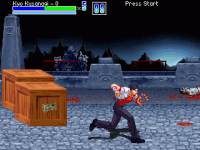
Fixed Kyo's Chizuru Palette Teeth due to the palette's teeth black.
Xavier Contreras
Member
I was wanted to do Free Special moves, but how can I make the effects scaled right?

maxman
Well-known member
You can use the latest drawmethod with scale like this.
Or this original command:
drawmethod:
The former is easier.
Look up in the manual here.
 dcemulation.org
Or here.
Code:
anim follow1
    delay 3
    offset 360 272
    drawmethod scale 0.52 0.52 # drawmethod scale {scalex} {scaley}
    @cmd randDir
    frame data/chars/misc/flash/L_flash/8200_0.png
    frame data/chars/misc/flash/L_flash/8200_1.png
    frame data/chars/misc/flash/L_flash/8200_2.png
    frame data/chars/misc/flash/L_flash/8200_3.png
    frame data/chars/misc/flash/L_flash/8200_4.png
    frame data/chars/misc/flash/L_flash/8200_5.png
    frame data/chars/misc/flash/L_flash/8200_6.png
    frame data/chars/misc/flash/L_flash/8200_7.png
    frame data/chars/misc/flash/L_flash/8200_8.png
    frame data/chars/misc/flash/L_flash/8200_9.png
    frame data/chars/misc/flash/L_flash/8200_10.png
    frame data/chars/misc/flash/L_flash/8200_11.png
    @cmd suicide
    frame data/chars/misc/flash/L_flash/8200_11.png
Or this original command:
Code:
anim follow1
    delay 3
    offset 360 272
    drawmethod 128 128 0 0 0 1 0 0 0 0 # drawmethod {scalex} {scaley} {flipx} {flipy} {shiftx} {alpha} {remap} {fillcolor} {rotate} {fliprotate}
    @cmd randDir
    frame data/chars/misc/flash/L_flash/8200_0.png
    frame data/chars/misc/flash/L_flash/8200_1.png
    frame data/chars/misc/flash/L_flash/8200_2.png
    frame data/chars/misc/flash/L_flash/8200_3.png
    frame data/chars/misc/flash/L_flash/8200_4.png
    frame data/chars/misc/flash/L_flash/8200_5.png
    frame data/chars/misc/flash/L_flash/8200_6.png
    frame data/chars/misc/flash/L_flash/8200_7.png
    frame data/chars/misc/flash/L_flash/8200_8.png
    frame data/chars/misc/flash/L_flash/8200_9.png
    frame data/chars/misc/flash/L_flash/8200_10.png
    frame data/chars/misc/flash/L_flash/8200_11.png
    @cmd suicide
    frame data/chars/misc/flash/L_flash/8200_11.png
drawmethod:
drawmethod {scalex} {scaley} {flipx} {flipy} {shiftx} {alpha} {remap} {fillcolor} {rotate} {fliprotate}
- This command defines how current frame will be drawn. There is a more user friendly/shortcut version after the explanation.
- {scalex} is integer value, when set to 256, the frame will be drawn in original width, use different values to scale it. Negative value will flip the frame.
- {scaley} is integer value, when set to 256, the frame will be drawn in original height, use different values to scale it. Negative value will flip the frame.
- {flipx} is integer value, when set to 1, the frame will be flipped leftright.
- {flipy} is integer value, when set to 1, the frame will be flipped updown.
- {shiftx} is integer value, use to lean the sprite. Might not be quite useful, it is used by gfxshadow, just add it.
- {alpha} is integer value.
- 0 = No alpha effect.
- 1-6 = Alpha 1-6
- -1 = Use entity's alpha.
- {remap} is integer value. Will be overriden by {alpha}.
- 0 = No remap.
- 1-n = Like a map command in spawn entry, give the entity a colormap.
- -1 = Use entity's colormap.
- {fillcolor} is integer value, from 0 to 255, specify a color index in your palette. It can be used with alpha, fill current frame with this color.
- {rotate} is integer value to specify rotation angle(clockwise), from 0 to 359. If you use a value out of the range, it will be changed automatically, for example, 370 will be changed to 10, -20 will be changed to 340.
- {fliprotate} is binary value. When it is set to 1(should be only 0 or 1, not other values), the entity will change the rotate value when the direction is changed(entity's direction, if you use flipx for the frame, it is not affected), the rotate value will be 360-original, so
- This command affect all frames starting from current frame. If you want to stop it, use 'nodrawmethod' below.
NOTE: Here are the new drawmethod commands, uTunnels changed some of the from the old logic (like using 0~1.0 instead of 0~256 for scale to make it more user friendly)
drawmethod scale {scalex} {scaley}
- If scaley is not specified, it is the same as scalex. For example, drawmethod scale 1.5 will scale the whole sprite by 1.5.
The former is easier.
Look up in the manual here.
OpenBORManual - DCEmulation
Or here.
Xavier Contreras
Member
Thank you, I'll do my best.You can use the latest drawmethod with scale like this.
Code:anim follow1 delay 3 offset 360 272 drawmethod scale 0.52 0.52 # drawmethod scale {scalex} {scaley} @cmd randDir frame data/chars/misc/flash/L_flash/8200_0.png frame data/chars/misc/flash/L_flash/8200_1.png frame data/chars/misc/flash/L_flash/8200_2.png frame data/chars/misc/flash/L_flash/8200_3.png frame data/chars/misc/flash/L_flash/8200_4.png frame data/chars/misc/flash/L_flash/8200_5.png frame data/chars/misc/flash/L_flash/8200_6.png frame data/chars/misc/flash/L_flash/8200_7.png frame data/chars/misc/flash/L_flash/8200_8.png frame data/chars/misc/flash/L_flash/8200_9.png frame data/chars/misc/flash/L_flash/8200_10.png frame data/chars/misc/flash/L_flash/8200_11.png @cmd suicide frame data/chars/misc/flash/L_flash/8200_11.png
Or this original command:
Code:anim follow1 delay 3 offset 360 272 drawmethod 128 128 0 0 0 1 0 0 0 0 # drawmethod {scalex} {scaley} {flipx} {flipy} {shiftx} {alpha} {remap} {fillcolor} {rotate} {fliprotate} @cmd randDir frame data/chars/misc/flash/L_flash/8200_0.png frame data/chars/misc/flash/L_flash/8200_1.png frame data/chars/misc/flash/L_flash/8200_2.png frame data/chars/misc/flash/L_flash/8200_3.png frame data/chars/misc/flash/L_flash/8200_4.png frame data/chars/misc/flash/L_flash/8200_5.png frame data/chars/misc/flash/L_flash/8200_6.png frame data/chars/misc/flash/L_flash/8200_7.png frame data/chars/misc/flash/L_flash/8200_8.png frame data/chars/misc/flash/L_flash/8200_9.png frame data/chars/misc/flash/L_flash/8200_10.png frame data/chars/misc/flash/L_flash/8200_11.png @cmd suicide frame data/chars/misc/flash/L_flash/8200_11.png
drawmethod:
The former is easier.
Look up in the manual here.
OpenBORManual - DCEmulation
Or here.
Xavier Contreras
Member
Here are some free special moves, is this offset of the effects not perfect? and the latest one called randir script just crashes, it doesn't work
 .
.
Bloodbane
Well-known member
Well, there's nothing to compare with so we can't tell if they are perfect or not.is this offset of the effects not perfect? and the latest one called randir script just crashes, it doesn't work
As for latest one, can you elaborate more about this effect using randir function?
maxman
Well-known member
Sorry. I had a power outage for hours when I was composing this post. Thankfully, my draft is saved here after I restored my browser.
randDir is a custom animation script I made, which is for flash effects (hit sparks) that face different directions randomly like you see in Capcom VS SNK 2. It is separate, though. It doesn't have to come along with drawmethod at all. Why do you mind that script? Do you really want to use that randDir script? Try not to panic when it comes to crashing.
Here's the code for it:
Do you know how to declare and use animationscript?
and the latest one called randir script just crashes, it doesn't work
randDir is a custom animation script I made, which is for flash effects (hit sparks) that face different directions randomly like you see in Capcom VS SNK 2. It is separate, though. It doesn't have to come along with drawmethod at all. Why do you mind that script? Do you really want to use that randDir script? Try not to panic when it comes to crashing.
Here's the code for it:
Code:
void randDir()
{ // Beginning of the main use from this certain animation script

    // Randomized facing, used for Flash

    void self = getlocalvar("self"); // Get local calling entity in this particular script
    int r = rand()%3; // Total number for random values is 7 since 0 is counted. It is optional to change the number desired.

    if(r >= -3 && r < 0) // Between values negative three and negative one because the random value is less than zero
    { // Beginning of this condition
        changeentityproperty(self, "direction", 0); // Entity faces left
    } // End of condition
    else if(r >= 0 && r <= 3)
    { // Beginning of another condition
        changeentityproperty(self, "direction", 1); // Entity faces right
    } // End of another condition

} // The end of its use
Do you know how to declare and use animationscript?
Xavier Contreras
Member
Showcasing Stage 2.
Xavier Contreras
Member
Listen, if your hearing this, our internet is down due to the cold weather. Sunday ago my internet have been broken for how windy and cold and freezing it is for doing that, unfortunately due to our internet felt slow and frozen, In The Night Of Valentin for OPENBOR will be continued next 2 weeks. I hope you have a good time, take care.
Xavier Contreras
Member
Now a days in Valentine's Day, I felt like I have to cancel a sprite idea and it well be replaced with the original CVS Sprite, The scaling for the effects felt to weak and sometimes dodgy, so I cancelled a sprite idea, I guess I'll continue on the Original CVS Sprite so it could come in handy, and return for the next mod.
Xavier Contreras
Member
Hey everyone, so months ago back in December 2022 the first idea on this project called In The Night Of Valentin. Apart from way taking to long to scale the special move effects, in this game Kyo Kusanagi will knock down creatures and demons and randomly be transported to the survival fights, so in the plan game this idea of In The Night Of Valentin's Stage 3 was supposed to look like until In The Night Of Valentin is scrapped. I don't know if you guys like me to make another first game project with Kyo Kusanagi and Athena Asamiya, I'll might try to do it.
Here's how these looked like before it was Cancelled:
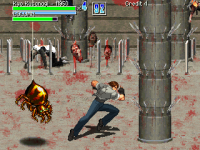
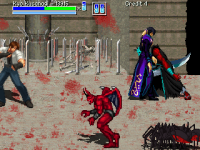
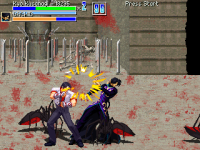
Here's how these looked like before it was Cancelled:

Hey everyone, so months ago back in December 2022 the first idea on this project called In The Night Of Valentin. Apart from way taking to long to scale the special move effects, in this game Kyo Kusanagi will knock down creatures and demons and randomly be transported to the survival fights, so in the plan game this idea of In The Night Of Valentin's Stage 3 was supposed to look like until In The Night Of Valentin is scrapped. I don't know if you guys like me to make another first game project with Kyo Kusanagi and Athena Asamiya, I'll might try to do it.
Here's how these looked like before it was Cancelled:
View attachment 3403 View attachment 3404 View attachment 3405
Thanks for letting us know @Xavier Contreras. Good luck in future projects.
DC