"RotationSprite" Scale small sprites and rotate sprites without color loss

NED

Well-known member
Most of us uses existing sprite set or sprite rips
Sometimes we encounter size problems.
Ex: CVS player and SOR enemies
By scalling enemies, you can make them match the standard size.
But, with openbor's method it can make graphics awkward.
If you scale it otherwise ther is color loss, even worse...

The solution is "Rotation sprite"
A small tool I already suggested to some modders.
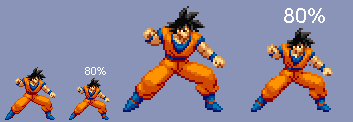
with this tool you can scale up or scale down a character sprite with really decent results.
I suggest to edit a bit what you finally get for better graphics.

Only bad point, you cannot scale X and Y with different values... ???

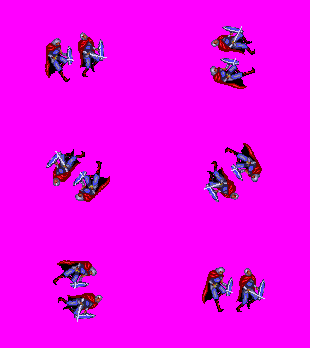
Also, this tool can help you create motations to your sprite.
Again, with correct results.
Very useful when you need to frankensprite body parts that are not displayed in the good position. Or create new pain/fall anims.

http://info.sonicretro.org/RotSprite

I massively used it in my project World Arena and the result was really good!
I used it for some of Kisarah sprite edits for the great World Heroes Supreme Justice to help Magggas. :)
[PIC]

Don't forget, always make saves of your work before updating something. :)

Exemple :
"Warning, this is what i get after scalling up and some sprite editing work on face"
ref00000.png
 
I used RotSprite to rotate, but I didn't know you could use it to scale and resize, too... Interesting...

Good lookin' out, Ned!
 
Ive been using this for a while now and it's the best solution to resizing. the only problem is, it has no instructions so its all experimental.
 
NickyP said:
I used RotSprite to rotate, but I didn't know you could use it to scale and resize, too... Interesting...

Good lookin' out, Ned!

For scalling, you just have to change scalling value "1.000000" (= 100%) to something else like "1.500000" (= 150%), "2.000000" (= 200%), or anything else.

@everybody : Thanks. Hope it can help all of you on sprite work in your mods! :)
It really helped me.
One thing about it  is you can use "small" characters from unknown 16 bits games in games with "regular" arcade size sprite to make interesting mix.
Also, I used it for my referee who initially did not have pain and fall sprites, I created all his sprites from existing ones.
 
you can make smaller sprites larger and clean but they still lack the detail of sprites like street fighter 3
 
Yes. It's true.
Like every software, this one cannot genereate details where there is not. ::)

This is why personally, I add details by spriting over it after scaling.
Mostly face details for characters...

ref00000.png
 
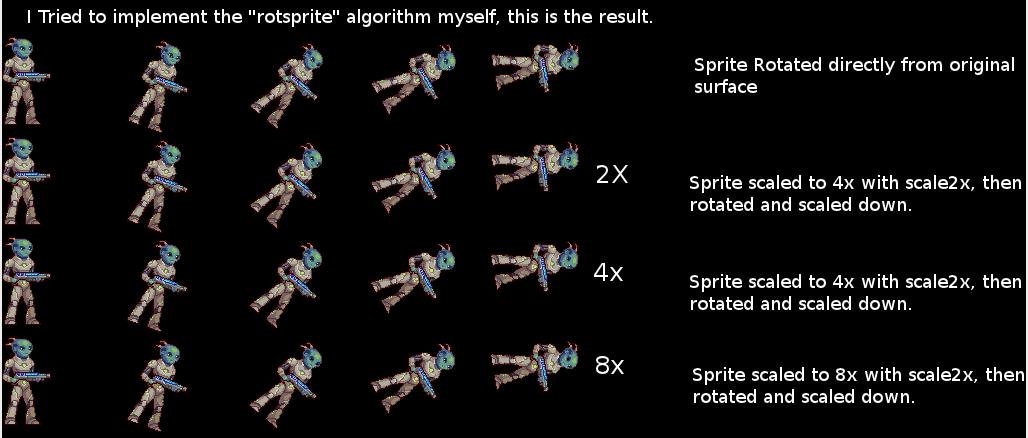
A quick tip: graphic programs works with 15º subdivisions, so every angle which is a multiple of it (15º, 30º, 45º and so on) will work perfectly. The same can be used for scaling (0.75, 115, etc) but for scaling you can use multiple of 10 too. You will get better results using those values.

(zoomed for better view)
C94hdXW.png

00b37ZJ.gif


another tip: to rotate the sprites in a clockwise direction, put a negative value.

I spread out this over all mugen foruns :) really thanks for this.
 
Another minor tip; if using Photoshop you have dozens of options. A couple that are very important:

[list type=decimal]
[*]Anti Aliasing: This must be turned off. It's a great feature for just about anything else, but destroys sprites. This is where the infamous pink "glow" tends to come from.
[*]Transform Algorithm: Always choose "Nearest Neighbor". Just like anti aliasing, the others are useful for just about anything else except sprite work.
[*]Save For Web: Always use the Save For Web dialog, and make sure you are consistent with palette/settings. This dialog is quite effective at making very optimized sprite files, allows you to create presets to save time and also works with Photoshop's recorded action macro functionality. Merely choosing Save As automatically includes a ton of metadata and useless other tidbits that bloat the image file.
[/list]
 
DC, we know about this. But none of those options can match the quality of this tool.

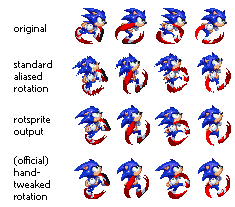
See for yourself: the second line is the common PS output. The third line is the tool output
Rotsprite2.png
 
O Ilusionista said:

I'm not advocating which is better - those are just tips for how to get the most out of a very powerful tool. Also, Photoshop can produce quite comparable results with refine edges tweaking. Not that I'd bother - this little tool seems to be a much simpler "click and done" approach. But the capability is there.

DC

 
I can advocate because I use PS since the version 4 :)
There is no way to archive the same results on photoshop without a lot of work.
 
Photshop 3 here, rookie (kidding natch) - though unlike you I haven't messed with Fireworks much and sorely miss ImageReady. I have the CS6 Master Collection, but still keep CS3 around just for that.

And I admit it takes work, again that's not really the point at all. Since you were giving tips, just added a few to help quell some common gotchas.

DC
 
Don't even put a line to me on mugen boards  :P

Hope it'll be useful for mugen creators too.
Perhaps it can avoid having some blurry scalled characters that was a kind of fashion back in the years... (craziness of fake HD sprites...)
 
we talk about making smaller sprites larger but what about larger sprites smaller. Guilty Gear size to Street fighter 3 size. how much detail is lost, and does it still look clean in reverse :o
 
Don't even put a line to me on mugen boards
why? I gave you all the credits :
http://www.infinitymugenteam.com/Forum_345/index.php?topic=40422


The user  Altoiddealer gave another option: SolarStrings Sprite Rotator
https://github.com/salmonmoose/SpriteRotator

The results are great too
example.png
 
Sorry, I read too fast... :P

About Altoiddealer options, what does it actually changes.
Seems interesting!! :D

I'm pretty sure there is a lot of small softwares to make good effect, we just have to find them... ::)
 
O Ilusionista said:
A quick tip: graphic programs works with 15º subdivisions, so every angle which is a multiple of it (15º, 30º, 45º and so on) will work perfectly. The same can be used for scaling (0.75, 115, etc) but for scaling you can use multiple of 10 too. You will get better results using those values.

(zoomed for better view)
C94hdXW.png

Very promising indeed! I just have no idea what I would use it for... I typically work with smaller sprites anyways, so any resizing I need done is achieved easily due to pixelation. But I'll definitely keep this in mind!
 
Back
Top Bottom