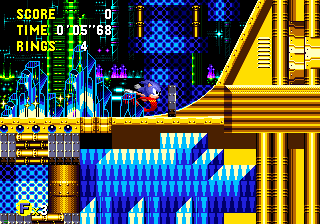
Sorry I forgot I'd mentioned this already, I'm not trying to nitpick, I've just messed with some of those megaman sprites before. They look better to me just increasing the colour/contrast. Makes them more metallic and shiny.

Of course I seen your mods

I've only played them a little bit, I really like them thou. The sprite clash doesn't really bother me, but I can notice it's probably not too hard to make them match better with some tweaking. Probably easier to sort it out as you go, do it sooner than later. I helped count monte tweak D&D, there was so many sprites we had to average it out and batch process a lot of stuff in the end. It would of been easier if he had been matching sprites to the original capcom stuff as he went.
I mean you COULD go all out and perfectly emulate the sonic look on everything, but that's a lot of work. But it's easy to get the sprites and backgrounds all roughly the same
This palette for leo looks pretty good on this stage, if it were me I'd make all the sprites bold/saturated like this. And make all the stages match this style.
The sprites will match and you can keep the classic SONIC look. Or if you prefer you could have bold sprites on faded backgrounds like this,
personally l prefer the retro colour of the old stages, so I would just contrast these more to match the sonic ones. And the megaman sprites are an easy match with increased contrast, so it's less work doing it like this. Will be easy to fix the sprites, then only certain background will need to be edited.
Stuff like this just increase contrast and some brightness.
a bit overboard cause I'm using a screenshot, but you get the idea. Background images might want to be faded/darker, but panels and foreground should be bold.
Anyhow go with whatever style you like best, depends what you prefer. I just thought the retro sonic style would be easiest.