Spawn String on Frames (EDIT)

Crimsondeath

Active member
Hi again,
I'm trying to use drawstring and drawsprite texts for the OpenBOR menus, like the Hall of the Fame (Scoreboards), Stage Complete screen and the game Title Screen, using globalvars, conditions, etc for translation purpose (if I want the game in spanish I just have to change a variable and everything is done :D ). I have been succesful in every of them unless the Player Selection Screen:

obpHDz1.jpeg


The problem is that player stats and name only appear when a player join to the game, there are 2 players too, so the texts must appear in the "Player 2" Column.

So, how can I detect if a player is active or inactive in the player select screen? :(

I have tried with getplayerproperty("joining"), getplayerproperty("entity"), using ondrawscript and openborvariant("player"), openborvariant("player1"), openborvariant("player2") but no luck.

Thanks in advance.

BIG EDIT:

Ok, looks like I'm almost to solve this problem, just need that the stats and player name don't blink :( :


Here is my code:
Code:
anim    waiting
    loop    1
    delay    1
    offset    49 202
    fshadow    0
    @script
    if(frame >= 0 && frame <= 3){
            drawstring(42, 155, 0, "ISOLDE");
            drawstring(42, 176, 0, "POWER");
             drawstring(42, 200, 0, "SPEED");
        }
    @end_script
    frame    data/chars/isolde/waiting1.gif
    frame    data/chars/isolde/waiting1.gif
    frame    data/chars/isolde/waiting1.gif

Any way to solve it?
 
Last edited:
just need that the stats and player name don't blink :(
The drawstring will not work well in an animation, I suggest to use update/ondraw events.

1738090815639.png

Instead, I suggest to try the settextobj function.

// settextobj(int index, int x, int y, int font, int z, char text, int time {optional})

Example:
Code:
anim attack1
    fastattack 1
    jugglecost 4
    forcedirection -1
    otg 1
    loop    0
    delay    4
    offset    62 125
    bbox    50 55 23 74
    @cmd hitfx "data/sounds/sor2_hit.wav"
    @cmd sound "data/sounds/sor2_attack.wav"
    @cmd settextobj 0 50 50 0 1001 "TEST" 300+openborvariant("elapsed_time")
    frame    data/chars/heroes/axel/sor2/a100.png
    attack 62 61 42 13 2 0 0 0 25 12
    frame    data/chars/heroes/axel/sor2/a101.png
 
The drawstring will not work well in an animation, I suggest to use update/ondraw events.

View attachment 10092

Instead, I suggest to try the settextobj function.


Example:
Code:
anim attack1
    fastattack 1
    jugglecost 4
    forcedirection -1
    otg 1
    loop    0
    delay    4
    offset    62 125
    bbox    50 55 23 74
    @cmd hitfx "data/sounds/sor2_hit.wav"
    @cmd sound "data/sounds/sor2_attack.wav"
    @cmd settextobj 0 50 50 0 1001 "TEST" 300+openborvariant("elapsed_time")
    frame    data/chars/heroes/axel/sor2/a100.png
    attack 62 61 42 13 2 0 0 0 25 12
    frame    data/chars/heroes/axel/sor2/a101.png

Text objects do not work in the Select screen, only levels. You will need to use an update script for the Select Screen items.

DC
 
Thanks for the info, I didn't know that.

NP. Technically, text objects are part of the level. Under the hood, they are a set of level properties that are used to run a drawstring, and they are executed during the level routine. Select screens are not levels, so there's nothing executing the textobjects.

C:
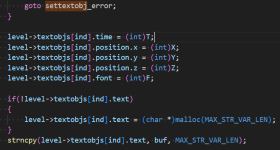
void draw_textobjs()
{
    int i;
    s_textobj *textobj;
    if(!level)
    {
        return;
    }
    for(i = 0; i < level->numtextobjs ; i++)
    {
        textobj = level->textobjs + i;

        if(textobj->time && textobj->time <= _time)        //If a time was set and passed, remove the text object.
        {
            level->textobjs[i].time    = 0;
            level->textobjs[i].position.x = 0;
            level->textobjs[i].position.y = 0;
            level->textobjs[i].font = 0;
            level->textobjs[i].position.z = 0;
            if(level->textobjs[i].text)
            {
                free(level->textobjs[i].text);
                level->textobjs[i].text = NULL;
            }
        }
        else
        {
            if(textobj->text)
            {
                font_printf(textobj->position.x, textobj->position.y, textobj->font, textobj->position.z, "%s", textobj->text);
            }
        }
    }
}

DC
 
NP. Technically, text objects are part of the level. Under the hood, they are drawstring functions run as part of the level update routine.

DC
Yeah, I'm looking at the source right now and it really uses many level references.

1738113888048.png

To be honest I never tried the settextobj in the select screen, tested right now and it closes the engine instantly.
 
Any way to solve it?
Don't use it on animationscript like that, or the text will blink.
Use it on ondrawscript instead, with "in_selectscreen" trigger.

But there is a catch. You will need to use a script to get the player name so you can change the values accordingly

C-like:
if(openborvariant("in_selectscreen"))
{
void self = getlocalvar("self"); // get caller
void Tname = getentityproperty(self,"model"); //get caller model

switch(Tname) { // check the model name
        case "Isolde" :
            drawstring(42, 155, 0, "ISOLDE");
            drawstring(42, 176, 0, "POWER");
            drawstring(42, 200, 0, "SPEED");
        break;
       
        default : // in case of none of above
        break;
        }
}

Remember scripts are case sensitive, so if your character is called ISOLDE and you use Isolde, it won't work.
 
Last edited:
Back
Top Bottom