Spawn text after taking an item

Guys, I've checked spawnScreen script and there's simpler solution, which is this:
C:
void spawnScreen(void name, float fX, float fY, float fZ, int dir, void ani)
{//Spawn entity at specific location relative to xPos and yPos
  void vSpawn    = spawn01(name, 0, 0, 0, 0, dir, NULL(), NULL(), ani);
  float xPos    = openborvariant("xpos");
  float yPos    = openborvariant("ypos");

  fX = xPos+fX;
  fZ = yPos+fZ;
  changeentityproperty(vSpawn, "position", fX, fZ, fY);
}

Yes, I only omitted fY adjustment line to solve it (aside of omitting self).
@Bloodbane Thanks man, tested and works too :)
I didn't test all levels and don't know about platforms or cameratype, this is why I considered all the 3 axis.
 
I'm assuming you want to spawn text similar to spawning FXs when special animation is performed, am I right?
 
Guys I wanted to apply the other type of text for a character when playing a special animation and videos are now unavailable!
@Chris Monvel I erased some videos, but here's some steps to follow.

- copy/paste the script files to your scripts folder
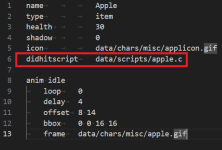
- call the didhit event in the pickable item

1764628101824.png
- done, as soon as you pick the item, it will trigger the didhitscript, spawning the text entity.

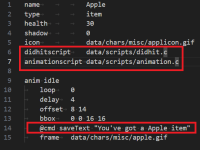
If you are looking for the RPG style (floating text), just add the animation script in the item header and configure the saveText function, like the image below.

1764628532162.png
 
I don't have the intention of spawning the floating text when taking an item this time, just spawning the text when playing an animation (nothing else required). The thing is that i don't remember what scripts do I need and don't want to replace them or switch because Im also using the text entity so I need both working for different situations. Original script files also seem to be deleted from download link.

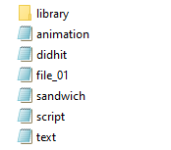
This is my scripts library i'm currently using

Scripts library
 
Last edited:
I don't have the intention of spawning the floating text when taking an item this time, just spawning the text when playing an animation (nothing else required). The thing is that i don't remember what scripts do I need and don't want to replace them or switch because Im also using the text entity so I need both working for different situations. Original script files also seem to be deleted from download link.

This is my scripts library i'm currently using

Scripts library
For a simple text spawn maybe it would be easier if using the settextobj function directly in an animation.
I posted an example some time ago in this post.
 
For a simple text spawn maybe it would be easier if using the settextobj function directly in an animation.
I posted an example some time ago in this post.
It works but looks more like a generic system text. I want the text to float over the character's head to emphasize player's action
 
Those steps work when grabbing items. I don't want to use any items, just spawn the floating text over character when playing an attack animation
Hmm now I understand. I'm checking the code right now to see how to adapt it for you.
 
Yeah that was it
So, you can download the modified file here.

I modified the RPG style code and now you can call any text using the example below.
I split it into 2 functions because this way you can save the text and spawn it in different moments of the animation.

Just add it to your script library using the same format as I did in this example, and it should work fine in your game.
Please let me know if it's working as intended.

Code:
anim attack1
    loop    0
    delay    5
    offset    45 119
    bbox    21 2 45 119
    @cmd saveText "Attack"
    @cmd spawnToss "Text" 0 0 1 0 1 0
    frame    data/chars/maxima/punch000.gif
    frame    data/chars/maxima/punch001.gif
    attack    76 21 42 39 7
    bbox    31 6 51 116
    frame    data/chars/maxima/punch002.gif
    frame    data/chars/maxima/punch003.gif
    attack    0 0 0 0 0
    bbox    31 5 50 116
    frame    data/chars/maxima/punch004.gif
 
So, you can download the modified file here.

I modified the RPG style code and now you can call any text using the example below.
I split it into 2 functions because this way you can save the text and spawn it in different moments of the animation.

Just add it to your script library using the same format as I did in this example, and it should work fine in your game.
Please let me know if it's working as intended.

Code:
anim attack1
    loop    0
    delay    5
    offset    45 119
    bbox    21 2 45 119
    @cmd saveText "Attack"
    @cmd spawnToss "Text" 0 0 1 0 1 0
    frame    data/chars/maxima/punch000.gif
    frame    data/chars/maxima/punch001.gif
    attack    76 21 42 39 7
    bbox    31 6 51 116
    frame    data/chars/maxima/punch002.gif
    frame    data/chars/maxima/punch003.gif
    attack    0 0 0 0 0
    bbox    31 5 50 116
    frame    data/chars/maxima/punch004.gif
I already have "animation" "didhit" and "text" operating for the text entity and don't want to overwrite them and I'm afraid to rename them expecting them to not work at all
 

Attachments

  • dsdsdsds.png
    dsdsdsds.png
    2.8 KB · Views: 0
I already have "animation" "didhit" and "text" operating for the text entity and don't want to overwrite them and I'm afraid to rename them expecting them to not work at all
Can you send me your latest scripts folder? I need to see the content in order to know how to mix the library.
 
Back
Top Bottom