
You are using an out of date browser. It may not display this or other websites correctly.
You should upgrade or use an alternative browser.
You should upgrade or use an alternative browser.
Thank you Bloodbane.....
- Thread starter xyz555
- Start date


xyz555
Member
magggas said:Hm.. i'm a little confused here. Is this topic a public personal message? Well very clever Sir ;D
no necessarily. If there are good people who are willing to help me, I am also very grateful.
Thank you


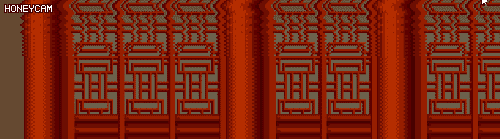
This functionality is built into the engine. You just need to add a layer (either bglayer or fglayer), with the appropriate watermode turned on. This will apply a sine wave to the image, which is exactly the effect you are asking for. From there just play around with the adjustments a bit until it looks the way you want.

mersox
Active member
Damon Caskey said:This functionality is built into the engine. You just need to add a layer (either bglayer or fglayer), with the appropriate watermode turned on. This will apply a sine wave to the image, which is exactly the effect you are asking for. From there just play around with the adjustments a bit until it looks the way you want.
But that effect is applied to the whole image, no? It seems that OP wants the sine wave effect to gradually affect the upper part of the image.
mersox said:But that effect is applied to the whole image, no? It seems that OP wants the sine wave effect to gradually affect the upper part of the image.
See also.. layers. That's how the pros do it and that's how OpenBOR works. You break your background design into layers, and work from there. For the example above, one layer has no sine wave, the next has a small wave, and the third a slightly larger one. Use the same speed for each, just with a bit more amplitude.
DC
mersox
Active member
Damon Caskey said:mersox said:But that effect is applied to the whole image, no? It seems that OP wants the sine wave effect to gradually affect the upper part of the image.
See also.. layers. That's how the pros do it and that's how OpenBOR works. You break your background design into layers, and work from there. For the example above, one layer has no sine wave, the next has a small wave, and the third a slightly larger one. Use the same speed for each, just with a bit more amplitude.
DC
Wouldn't you be able to notice the cuts though? The waves wouldn't blend into one another. Correct me if I'm wrong.
Unless you cut the BGs at an exact measure and have the sin's start and end in a way that it exactly matches the cuts. That sounds like the type of workarounds that I do, that end up costing me many hours of work. Might make more sense to use script. But I might be talking nonsense.

O Ilusionista
Captain 100K
xyz555
Member
But I have to use it in the main body of (spawn01). So the ring has to be implemented with a script. Thank you.Damon Caskey said:This functionality is built into the engine. You just need to add a layer (either bglayer or fglayer), with the appropriate watermode turned on. This will apply a sine wave to the image, which is exactly the effect you are asking for. From there just play around with the adjustments a bit until it looks the way you want.
xyz555
Member
mersox said:Damon Caskey said:mersox said:But that effect is applied to the whole image, no? It seems that OP wants the sine wave effect to gradually affect the upper part of the image.
See also.. layers. That's how the pros do it and that's how OpenBOR works. You break your background design into layers, and work from there. For the example above, one layer has no sine wave, the next has a small wave, and the third a slightly larger one. Use the same speed for each, just with a bit more amplitude.
Yes, there is on the upper level, but not on the lower level. Thank you.
DC
Wouldn't you be able to notice the cuts though? The waves wouldn't blend into one another. Correct me if I'm wrong.
Unless you cut the BGs at an exact measure and have the sin's start and end in a way that it exactly matches the cuts. That sounds like the type of workarounds that I do, that end up costing me many hours of work. Might make more sense to use script. But I might be talking nonsense.

xyz555
Member
Bloodbane said:Since my name is mentioned, I better replay
Anyways, I don't know if scripted drawmethod could make such wavy FX but I agree with Damon's suggestion above. Since it's only background not entity, bglayer could do the trick
This is not the background. I want to use it on the entity. If the script is not available, then I can only replace it with the play of the image on the entity. Thank you, Bloodbane for your answer. Thank you, !
