
You are using an out of date browser. It may not display this or other websites correctly.
You should upgrade or use an alternative browser.
You should upgrade or use an alternative browser.
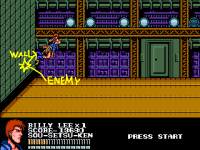
Solved wall effect
- Thread starter DD Tokki
- Start date
Question that is answered or resolved.
Solution

You'd need to give your enemies certain onblockwscript. Here's one for wall bounce:
WallBons.c
Save that script in data/scripts folder.
Declare this in enemies header text to apply that script:
WallBons.c
C:
void main()
{// Wall bounce on falling state
    void self = getlocalvar("self");
    int Vx = getentityproperty(self,"xdir");
    int Vy = getentityproperty(self,"tossv");
    int Vz = getentityproperty(self,"zdir");
    int Fall = getentityproperty(self, "aiflag", "drop");

    if(Fall==1){
      changeentityproperty(self, "velocity", -Vx*0.5, -Vz*0.5, Vy+1); // bounced
    }
}
Save that script in data/scripts folder.
Declare this in enemies header text to apply that script:
onblockwscript data/scripts/wallbons.c


O Ilusionista
Captain 100K
That animation has a bug with binded entities - once you trigger thre hitwall, any entity which was binded is unbind.Anim HITWALL (players,enemies)
Optional.
This animation is played when entity hits a wall while falling.
Check the manual
I've reported this long time ago Bindentity vs Hitwall animation · Issue #131 · DCurrent/openbor

DD Tokki
Well-known member
thank you However, if you apply this command and climb the terrain corresponding to the wall, the fallen enemy will instantly move away.Anim HITWALL (players,enemies)
Optional.
This animation is played when entity hits a wall while falling.
Check the manual
hitwall {enemies, players}
Removed. No longer valid.
If an entity had this animation, when they hit a wall after being thrown or flung, they would hang on the wall for about two seconds before sliding down.
This didn't work for screen edges, just for the ends of stages with the blocked command.
This animation has been removed. It no longer works.

Bloodbane
Well-known member
You'd need to give your enemies certain onblockwscript. Here's one for wall bounce:
WallBons.c
Save that script in data/scripts folder.
Declare this in enemies header text to apply that script:
WallBons.c
C:
void main()
{// Wall bounce on falling state
    void self = getlocalvar("self");
    int Vx = getentityproperty(self,"xdir");
    int Vy = getentityproperty(self,"tossv");
    int Vz = getentityproperty(self,"zdir");
    int Fall = getentityproperty(self, "aiflag", "drop");

    if(Fall==1){
      changeentityproperty(self, "velocity", -Vx*0.5, -Vz*0.5, Vy+1); // bounced
    }
}
Save that script in data/scripts folder.
Declare this in enemies header text to apply that script:
onblockwscript data/scripts/wallbons.c
DD Tokki
Well-known member
thank you It works fine. Now it looks natural on the wall.You'd need to give your enemies certain onblockwscript. Here's one for wall bounce:
WallBons.c
C:void main() {// Wall bounce on falling state void self = getlocalvar("self"); int Vx = getentityproperty(self,"xdir"); int Vy = getentityproperty(self,"tossv"); int Vz = getentityproperty(self,"zdir"); int Fall = getentityproperty(self, "aiflag", "drop"); if(Fall==1){ changeentityproperty(self, "velocity", -Vx*0.5, -Vz*0.5, Vy+1); // bounced } }
Save that script in data/scripts folder.
Declare this in enemies header text to apply that script:


@kdo,
Yes, you can do that. It's not exactly the same technique but very similar. You can use onmovex scripts to monitor position relative to screen limits and bounce any entity that starts to cross the border while falling. There's also an onblock event for screen edges that can do the same thing. The only catch for that method is enemies are normally allowed out of the screen, so you'd have to toggle their subject to screen flags.
DC
Yes, you can do that. It's not exactly the same technique but very similar. You can use onmovex scripts to monitor position relative to screen limits and bounce any entity that starts to cross the border while falling. There's also an onblock event for screen edges that can do the same thing. The only catch for that method is enemies are normally allowed out of the screen, so you'd have to toggle their subject to screen flags.
DC
Bloodbane
Well-known member
something like unless walls the enemy hits the screen limits as it is subject to the screen.
As Damon posted above, you could use onblocksscript with the above WallBons.c to get same effect. However, since enemies normally aren't subject to screen, you'll need to force them to.
One way to do it is to force it in their damage script. Then disable subject to screen when they rise or when they are bounced.

machok
Well-known member
How to do it for screen edge?You'd need to give your enemies certain onblockwscript. Here's one for wall bounce:
WallBons.c
C:void main() {// Wall bounce on falling state void self = getlocalvar("self"); int Vx = getentityproperty(self,"xdir"); int Vy = getentityproperty(self,"tossv"); int Vz = getentityproperty(self,"zdir"); int Fall = getentityproperty(self, "aiflag", "drop"); if(Fall==1){ changeentityproperty(self, "velocity", -Vx*0.5, -Vz*0.5, Vy+1); // bounced } }
Save that script in data/scripts folder.
Declare this in enemies header text to apply that script:
Try this but not working:
Code:
onblocksscript data/scripts/wallbons.cBloodbane
Well-known member
The script only works if the enemy is subject to screen. If you want to use this, either make enemies subject to screen or make them subject to screen only if they are knocked down by certain attack. Subject to screen is disabled after enemy lands or when enemy rises.
machok
Well-known member
Thank you it's working but I need to use subject to screen on every fall and rise anim to do this, is there a way to modify this wallbons script to get a similar result?The script only works if the enemy is subject to screen. If you want to use this, either make enemies subject to screen or make them subject to screen only if they are knocked down by certain attack. Subject to screen is disabled after enemy lands or when enemy rises.

@machokThank you it's working but I need to use subject to screen on every fall and rise anim to do this, is there a way to modify this wallbons script to get a similar result?
As a suggestion, you can use the same way I'm using on SORX. Basically, the subject to screen is changed to 1 when the enemy take any damage and is changed to 0 if is blocked by the screen edge while walking. To make it work you need to use respectively the takedamagescript and onblocksscript events.
takedamagescript
C:
void main()
{//Lock the screen edge (for enemies) if take any damage
    void self    = getlocalvar("self");
    void type  = getentityproperty(self,"type");
    int dead    = getentityproperty(self, "dead");

    if(type == openborconstant("TYPE_ENEMY") && !dead){
        changeentityproperty(self, "subject_to_screen", 1);
    }
}
onblocksscript
C:
void main()
{//Unlock the screen edge (for enemies) according to defined animations
    void self    = getlocalvar("self");
    void type  = getentityproperty(self,"type");
    int anim    = getentityproperty(self, "animationID");

    if(type == openborconstant("TYPE_ENEMY")){
        if( anim == openborconstant("ANI_WALK")||
            anim == openborconstant("ANI_RUN")){
            changeentityproperty(self, "subject_to_screen", 0);
        }
    }
}
You can combine the wall previous bouncing script inside the onblocksscript, like this@Kratus It works perfectly many thanks
but how you make enemy bounce back with screen edges? I mean like the screen edge hitting the enemy back inside so player can continue the combo
C:
void main()
{
    wallBounce();
    wallUnlock();
}

void wallBounce()
{// Wall bounce on falling state
    void self = getlocalvar("self");
    int Vx = getentityproperty(self,"xdir");
    int Vy = getentityproperty(self,"tossv");
    int Vz = getentityproperty(self,"zdir");
    int Fall = getentityproperty(self, "aiflag", "drop");

    if(Fall==1){
      changeentityproperty(self, "velocity", -Vx*0.5, -Vz*0.5, Vy+1); // bounced
    }
}

void wallUnlock()
{//Unlock the screen edge (for enemies) according to defined animations
    void self    = getlocalvar("self");
    void type  = getentityproperty(self,"type");
    int anim    = getentityproperty(self, "animationID");

    if(type == openborconstant("TYPE_ENEMY")){
        if( anim == openborconstant("ANI_WALK")||
            anim == openborconstant("ANI_RUN")){
            changeentityproperty(self, "subject_to_screen", 0);
        }
    }
}