In Progress Street Fighter Initial Impact

The project is currently under development.
Here is the strongest woman who is ready to test her strength in the bonus stage.

You know what would for work week for your bonus stage is something similar to Spartan x where those mad gear guys come at you at a fast past and only take one punch to KO.
Did you perhaps add a parry?
 
Personally I'd say go with MVC since it has some of the nicest burn and shock sprites.
WHSJextra did a nice job with regards to flames and shock effects as well.
I love this custom approach to our favorite warriors!
It's completely of the rails it.
Not for me but the in make for great inspiration.
Some of the effects are next level.
Hope this help.
That the same hit flash what @Kratus used.
I want to go from standard Hans to hand combat the have my game evolve into something like in the video
Nice. I didn't bother looking at the hit flash from his SFvKOF project. I will take a look at it again for the burn sprites. For the shock sprites, I'll think about it some other time.

You know what would for work week for your bonus stage is something similar to Spartan x where those mad gear guys come at you at a fast past and only take one punch to KO.
:LOL: One attack, KO. :LOL: You know. I think that's what I was thinking about, but only if there were more full sprites of the Mad Gear members other than just the 4 regular goons (Bred, Dug, Jake, and Simons). That would be fun to see. I'll think about what to do with those, regarding speed, but later. ;)

Did you perhaps add a parry?
Nah, didn't. That will come later, though I have a semi-complete block system for players.

Thank you for your suggestion(s), Grit.
 
Nothing to show but just the player's reaction to Game Over. Just found out now that noreflect 1 and attackbox with its z depth parameter work well together to reduce the continuing fighter's health points in the continue screen. I got the player's reaction to Game over done after the countdown ends.

 
Nothing to show but just the player's reaction to Game Over. Just found out now that noreflect 1 and attackbox with its z depth parameter work well together to reduce the continuing fighter's health points in the continue screen. I got the player's reaction to Game over done after the countdown ends.

I got to say Capcom did an amazing job on the sprite work. I look forward to working with those sprites after I'm done with Alpha sprites but I'm loving what you doing here with the continue screen.
Hearing that STF2 commentator countdown is so nostalgic.
 
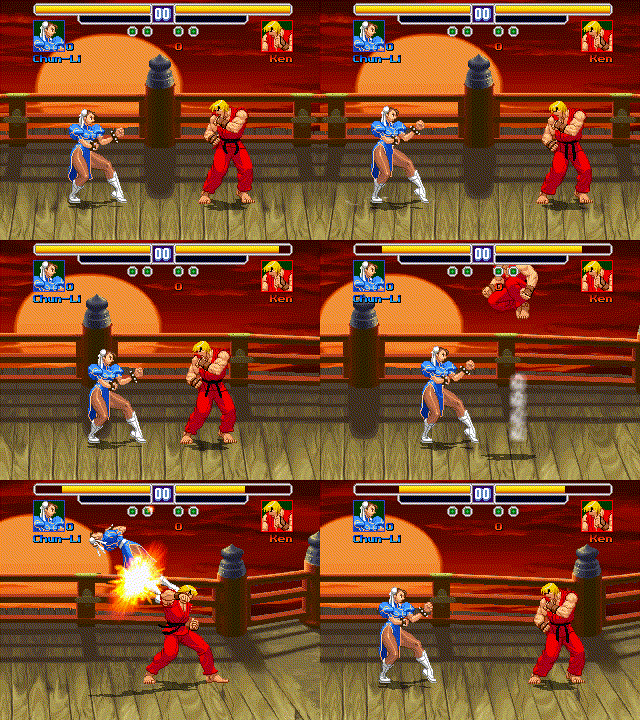
I recently added the dust effects for some fighters starting with Chun-Li and Ken. The dust effect for the fall animation is okay, but I'm not sure if I choose another one. The one for landing is okay also. However, I'm not sure about the one(s) for the jumping. Which following direction for the landing dust is better? Can't pick whether it's the 3 jumping dusts staying on the floor (Chun-Li) or they appear following the jumping fighter (Ken).

6-2-2024-11-48-20-PM-gif.gif
 
I recently added the dust effects for some fighters starting with Chun-Li and Ken. The dust effect for the fall animation is okay, but I'm not sure if I choose another one. The one for landing is okay also. However, I'm not sure about the one(s) for the jumping. Which following direction for the landing dust is better? Can't pick whether it's the 3 jumping dusts staying on the floor (Chun-Li) or they appear following the jumping fighter (Ken).

6-2-2024-11-48-20-PM-gif.gif
Ken's, to me.
 
However, I'm not sure about the one(s) for the jumping. Which following direction for the landing dust is better?
Neither honestly, if you were to checkout FHR data file you will find the appropriate dust effect.
Check out some of the effects caught in this sprite sheet.
I'm going to use the MVC flame and dust effects.
About Ken's sprite, did you perhaps increase its size?
Is here an application that can increase the size?
 

Attachments

I'm back.

I need help regarding the throws for Zangief. I would like to include most (maybe all) of his throws like (Super) SFII which he had F/B+MP/MK (close) as other parts of throws. I'm not sure since modern fighting games have a rule for the throwing system such as HP+HK (or LP+LK), forward/back + specific heavy attack, etc. I did play the vanilla version of SFII and he's got F+MP/HP and B+MP/HP (8 or 10 throws in total, including the bite which I've never done).

I would like to include them like this one since he's a grappler. I don't intend to add air throws unless I change my mind.

Look at the commands for Zangief's throws.

From 0:54-1:26:

From 0:56-1:24:

From 0:00-0:14:

From 0:21-0:46:
 
Last edited:
As of now, Zangief doesn't have standing/normal close-range attacks like Ryu and Chun-Li do. Just normal attacks. If I want to do throws like I did with Ryu and Chun-Li, I just have to add animations for close range attacks, but I name most of them as attack animations since I simply use anim attack1 as the default attack for light punch.

It's something to do with having a little bit more of options for commands (moves to grab scripts, maybe?), especially performing with medium attacks, as well as Stomach Screw. In SFA3, that's performed with diagonal down+forward and strong/medium punch. I forgot to say this one from my last post of here about performing his bite starting with the original SFII. It's the part of throw which I rarely use because I don't know how to make him bite in SFII. However, I don't remember executing it right except SFA3 (and probably CVS2).

I'd like to execute when he's close range for alternative throws, I think:
F+MP, B+MP, F+MK, B+MK, D+F+HP, D+B+HP, D+F+MP+HP, D+B+MP+HP

I have these codes for Zangief here, but no normal close-range attacks except Forward+HP and Back+HP under strong punch animation.

Code:
anim freespecial2 #Heavy Punch
    delay    2
    offset    337 291
    cancel 0 0 0 a a2 freespecial30
    cancel 0 0 0 a2 a freespecial30
    cancel 0 0 0 a freespecial30
    cancel 0 0 0 a2 freespecial30
    @cmd keyint3 "ANI_FREESPECIAL40" 0 "FA3" 0 0
    @cmd keyint3 "ANI_FREESPECIAL41" 0 "BA3" 0 0
    #range 20 50
    frame    data/chars/zangief/idle01.png
    delay 6
    bbox 323 178 54 114
    frame    Data/CHARS/Zangief/CVS2_Zangief_228.png
    bbox 324 181 57 111
    frame    Data/CHARS/Zangief/CVS2_Zangief_229.png
    bbox 324 188 66 104
    sound data/sounds/common/punch2.wav
    frame    Data/CHARS/Zangief/CVS2_Zangief_230.png
    move 5
    bbox 351 187 53 105
    attack3 400 194 69 30 11 0 0 0 0 0
    hitfx data/sounds/common/beat3.wav
    frame    Data/CHARS/Zangief/CVS2_Zangief_231.png
    move 0
    frame    Data/CHARS/Zangief/CVS2_Zangief_232.png
    bbox 333 186 51 105
    attack3 0
    frame    Data/CHARS/Zangief/CVS2_Zangief_233.png
    bbox 321 188 64 103
    frame    Data/CHARS/Zangief/CVS2_Zangief_234.png

Code:
anim freespecial40 #forward punch grab
    offset 337 291
    delay 6
    followanim 40
    followcond 2
    fastattack 1
    attack1 300 175 99 41 0 0 1 1 0 0
    hitfx data/sounds/empty.wav
    frame data/CHARS/Zangief/CVS2_Zangief_114.png
    attack 0
    frame data/CHARS/Zangief/CVS2_Zangief_115.png
    frame data/CHARS/Zangief/CVS2_Zangief_118.png
    frame data/CHARS/Zangief/CVS2_Zangief_119.png
    frame data/CHARS/Zangief/CVS2_Zangief_120.png

Code:
anim follow40 #forward punch throw
    offset 337 291
    delay 6
    jumpframe 5 1 1.6 0
    landframe 6
    @cmd slamstart2
    @cmd position 15 60 15 0 -1
    frame data/CHARS/Zangief/CVS2_Zangief_116.png # 0
    delay 14
    @cmd position 15 54 15 0 -1
    frame data/CHARS/Zangief/CVS2_Zangief_117.png # 1
    delay 9
    @cmd position 1 63 15 0 -1
    frame data/CHARS/Zangief/CVS2_Zangief_306.png # 2
    @cmd position 5 83 17 0 -1
    frame data/CHARS/Zangief/CVS2_Zangief_307.png # 3
    @cmd position 6 108 40 0 -1
    frame data/CHARS/Zangief/CVS2_Zangief_308.png # 4
    @cmd position 16 60 72 0 -1
    delay 1000
    frame data/CHARS/Zangief/CVS2_Zangief_309.png # 5
    sound data/sounds/fall.wav
    @cmd position 3 58 12 0 1
    delay 13
    frame data/CHARS/Zangief/CVS2_Zangief_313.png
    @cmd position 3 58 12 0 1
    frame data/CHARS/Zangief/CVS2_Zangief_314.png
    @cmd depost
    @cmd finish 8 2 1 1 0 -1
    frame data/CHARS/Zangief/CVS2_Zangief_315.png
    @cmd anichange "ani_follow29"
    frame data/CHARS/Zangief/CVS2_Zangief_315.png

Code:
anim freespecial41 #back punch grab
    offset 337 291
    delay 6
    followanim 41 #Switch to back punch throw
    followcond 2
    fastattack 1
    attack1 300 175 99 41 0 0 1 1 0 0
    hitfx data/sounds/empty.wav
    frame data/CHARS/Zangief/CVS2_Zangief_114.png
    attack 0
    frame data/CHARS/Zangief/CVS2_Zangief_115.png
    frame data/CHARS/Zangief/CVS2_Zangief_118.png
    frame data/CHARS/Zangief/CVS2_Zangief_119.png
    frame data/CHARS/Zangief/CVS2_Zangief_120.png

Code:
anim follow41 #back punch throw
    offset 337 291
    delay 6
    flipframe 1
    @cmd slamstart2
    @cmd position 15 60 15 0 -1
    frame data/CHARS/Zangief/CVS2_Zangief_116.png
    frame data/CHARS/Zangief/CVS2_Zangief_116.png
    delay 9
    @cmd position 15 54 15 0 -1
    frame data/CHARS/Zangief/CVS2_Zangief_117.png
    @cmd position 1 15 16 0 1
    frame data/CHARS/Zangief/CVS2_Zangief_396.png
    @cmd position 1 -37 19 0 1
    frame data/CHARS/Zangief/CVS2_Zangief_397.png
    @cmd position 5 -39 21 0 1
    frame data/CHARS/Zangief/CVS2_Zangief_398.png
    @cmd position 5 -39 21 0 1
    frame data/CHARS/Zangief/CVS2_Zangief_399.png
    @cmd position 12 -23 53 0 -1
    frame data/CHARS/Zangief/CVS2_Zangief_400.png
    @cmd position 4 86 87 0 -1
    frame data/CHARS/Zangief/CVS2_Zangief_401.png
    delay 19
    @cmd position 3 137 5 0 -1
    frame data/CHARS/Zangief/CVS2_Zangief_402.png
    @cmd depost 0
    @cmd finish 10 2 -2 1.8 0 -1
    frame data/CHARS/Zangief/CVS2_Zangief_403.png
    delay 9
    frame data/CHARS/Zangief/CVS2_Zangief_404.png
    frame data/CHARS/Zangief/CVS2_Zangief_405.png
    frame data/CHARS/Zangief/CVS2_Zangief_406.png
    frame data/CHARS/Zangief/CVS2_Zangief_407.png
    delay 6
    frame Data/CHARS/Zangief/TURN01.png
    frame Data/CHARS/Zangief/TURN02.png
    frame Data/CHARS/Zangief/TURN03.png
    frame Data/CHARS/Zangief/TURN04.png
    frame Data/CHARS/Zangief/TURN05.png

C:
void keyint3(void Ani, int Frame, void Key, int Hflag, int Limit)
{// Change current animation if proper key is pressed or released
// Animation is changed without attacking

    void self = getlocalvar("self");
    void Health = getentityproperty(self,"health");
    int Dir = getentityproperty(self, "direction");
    int iPIndex = getentityproperty(self,"playerindex"); //Get player index
    void iRKey;

      if (Key=="U"){ //Up Required?
        iRKey = playerkeys(iPIndex, 0, "moveup"); // "Up"
      } else if (Key=="D"){ //Down Required?
        iRKey = playerkeys(iPIndex, 0, "movedown"); // "Down"
      } else if (Key=="L"){ //Left Required?
        iRKey = playerkeys(iPIndex, 0, "moveleft"); // "Left"
      } else if (Key=="R"){ //Right Required?
        iRKey = playerkeys(iPIndex, 0, "moveright"); // "Right"
      } else if (Key=="F"){ //Forward Required?
        if (Dir == 0){ // Facing Left?
          iRKey = playerkeys(iPIndex, 0, "moveleft"); // "Left"
        } else { // Facing Right
          iRKey = playerkeys(iPIndex, 0, "moveright"); // "Right"
        }
      } else if (Key=="B"){ //Backward Required?
        if (Dir == 1){ // Facing Right?
          iRKey = playerkeys(iPIndex, 0, "moveleft"); // "Left"
        } else { // Facing Left
          iRKey = playerkeys(iPIndex, 0, "moveright"); // "Right"
        }
      } else if (Key=="A"){ //Attack Required?
        iRKey = playerkeys(iPIndex, 0, "attack"); // "Attack"
      } else if (Key=="A2"){ //Attack Required?
        iRKey = playerkeys(iPIndex, 0, "attack2"); // "Attack2"
      } else if (Key=="A3"){ //Attack Required?
        iRKey = playerkeys(iPIndex, 0, "attack3"); // "Attack3"
      } else if (Key=="A4"){ //Attack Required?
        iRKey = playerkeys(iPIndex, 0, "attack4"); // "Attack4"
      } else if (Key=="J"){ //Attack Required?
        iRKey = playerkeys(iPIndex, 0, "jump"); // "Jump"
      } else if (Key=="S"){ //Attack Required?
        iRKey = playerkeys(iPIndex, 0, "special"); // "Special"
      } else if (Key=="FA3"){
        if (Dir == 0){ // Facing Left?
          iRKey = playerkeys(iPIndex, 0, "moveleft", "attack3"); // "Left"
        } else { // Facing Right
          iRKey = playerkeys(iPIndex, 0, "moveright", "attack3"); // "Right"
        }
      } else if (Key=="BA3"){
        if (Dir == 1){ // Facing Right?
          iRKey = playerkeys(iPIndex, 0, "moveleft", "attack3"); // "Left"
        } else { // Facing Left
          iRKey = playerkeys(iPIndex, 0, "moveright", "attack3"); // "Right"
        }
      }

      if (Hflag==1){ //Not holding the button case?
        iRKey = !iRKey; //Take the opposite condition
      }

      if ((Health > Limit)&&iRKey){
        if (Ani=="ANI_IDLE"){ // Going idle?
          setidle(self, openborconstant("ANI_IDLE")); //Be idle!
        } else {
          changeentityproperty(self, "animation", openborconstant(Ani),2);
        }
        changeentityproperty(self, "animpos", Frame); //Change frame
      }
}

EDIT:
Ryu does have his close-range attacks, which I have to use for direction+attack buttons.

Code:
anim    freespecial2 #High punch
    @cmd    makeOpponentBlock
    @cmd    keyint2 "ANI_ATTACK3" 0 "F" 0
    @cmd    attack1 0 50 0 "ANI_ATTACK6"
    #range 0 45
    bbox    7 0 58 102
    offset    26 99
    delay    5
    sound data/sounds/common/punch2.wav
    hitfx data/sounds/common/beat3.wav
    frame    data/chars/ryu/188.gif
    @cmd    makeOpponentBlock
    offset    22 98
    frame    data/chars/ryu/189.gif
    offset    22 93
    @cmd    makeOpponentBlock
    frame    data/chars/ryu/190.gif
    attack6 53 8 55 30 12 0 0 0 0 0
    offset    16 93
    @cmd    makeOpponentBlock
    frame    data/chars/ryu/191.gif
    attack6 0 0 0 0 0 0 0 0 0 0
    frame    data/chars/ryu/192.gif
    frame    data/chars/ryu/193.gif
    delay 7
    offset    19 96
    frame    data/chars/ryu/194.gif
    offset    21 99
    frame    data/chars/ryu/195.gif
    bbox    7 0 47 103
    offset    24 99
    @cmd    makeOpponentUnblock
    frame    data/chars/ryu/196.gif

Code:
anim    attack6 #Close HP
    @cmd    keyint2 "ANI_freespecial57" 0 "F" 0 # Hold Forward + HP
    @cmd    keyint2 "ANI_freespecial31" 0 "B" 0 # Hold Back + HP
    @cmd    makeOpponentBlock
    offset    24 87
    delay    7
    sound data/sounds/common/punch2.wav
    range 0 44
    hitfx data/sounds/common/beat3.wav
    frame    data/chars/ryu/197.gif
    offset    24 93
    frame    data/chars/ryu/198.gif
    attack10 58 14 22 30 10 0 0 0 0 0
    offset    23 97
    frame    data/chars/ryu/199.gif
    range    0 44
    offset    25 117
    frame    data/chars/ryu/200.gif
    offset    24 113
    frame    data/chars/ryu/201.gif
    frame    data/chars/ryu/202.gif
    attack10 0 0 0 0 0 0 0 0 0 0
    @cmd    makeOpponentUnblock
    offset    24 108
    frame    data/chars/ryu/203.gif
    offset    24 98
    frame    data/chars/ryu/204.gif
    frame    data/chars/ryu/205.gif

Code:
anim    freespecial57 #Grab-to-throw forward
    offset    27 99
    delay    2
    followanim    9
    followcond    2
    fastattack    1
    hitfx data/sounds/empty.wav
    frame    data/chars/ryu/371.gif
    delay    7
    attack 37 7 25 51 0 0 1 1 50 0 0
    frame    data/chars/ryu/371.gif
    delay    2
    frame    data/chars/ryu/371.gif
    offset    27 98
    attack    0
    frame    data/chars/ryu/372.gif
    offset    27 92
    frame    data/chars/ryu/373.gif
    offset    27 93
    frame    data/chars/ryu/374.gif
    frame    data/chars/ryu/375.gif

Code:
anim    follow9 #Forward punch throw
    offset    48 94
    delay    25
    @cmd    slamstart2
    @cmd    position 0 -36 3 -4 1
    @cmd    camFocus 1
    frame    data/chars/ryu/376.gif
    delay 8
    offset    24 95
    @cmd    position 1 -20 21 -1 1
    frame    data/chars/ryu/377.gif
    offset    15 98
    @cmd    position 2 12 26 1 1
    frame    data/chars/ryu/378.gif
    offset    14 87
    @cmd    position 3 47 77 -1 1
    frame    data/chars/ryu/379.gif
    offset    8 77
    @cmd    position 4 67 76 0 1
    @cmd    camFocus 0
    frame    data/chars/ryu/380.gif
    @cmd    position 4 67 76 0 1
    @cmd    depost 0
    @cmd    throw 5 1 4.2 2.5 0 0
    frame    data/chars/ryu/380.gif
    offset    11 72
    @cmd    clearL
    frame    data/chars/ryu/381.gif
    offset    12 70
    frame    data/chars/ryu/382.gif
    offset    30 78
    frame    data/chars/ryu/383.gif
 
Last edited:
I'm not sure since modern fighting games have a rule for the throwing system such as HP+HK (or LP+LK), forward/back + specific heavy attack, etc. I did play the vanilla version of SFII and he's got F+MP/HP and B+MP/HP (8 or 10 throws in total, including the bite which I've never done).
There is no rule set on stone for that - and thanks heavens for that.
For example, I use F+HP or B+HP (or Kick, for kick throws) for throws in RMM, and they have a range check so I can still use F+HP as a directional input too.

And I like to make it more logical: The move will always throw the move to the same direction you are holding the input
So, even the move is a back throw like this
GD08tsA.gif

It will flip and throw the enemy forward if you hold forward.

It's the same logic I apply on OpenBOR for GRABFORWARD or GRABBACKWARD. And I try to use the same logic for GRABUP and GRABDOWN.
I think the only exception is Hawkeye, but he moves backward on GRABBACKWARD while he stomps on the enemy chest and then shoot an arrow.
 
Hi @maxman, I just wanted to mention something used in Kof 99, which was rather cool, HP would throw an opponent to the right of the screen and the HK to the left.
Since the P+K to grab method isn't used in this game.
 
There is no rule set on stone for that - and thanks heavens for that.
For example, I use F+HP or B+HP (or Kick, for kick throws) for throws in RMM, and they have a range check so I can still use F+HP as a directional input too.

And I like to make it more logical: The move will always throw the move to the same direction you are holding the input
So, even the move is a back throw like this
GD08tsA.gif

It will flip and throw the enemy forward if you hold forward.

It's the same logic I apply on OpenBOR for GRABFORWARD or GRABBACKWARD. And I try to use the same logic for GRABUP and GRABDOWN.
I think the only exception is Hawkeye, but he moves backward on GRABBACKWARD while he stomps on the enemy chest and then shoot an arrow.

I take a similar approach - in my IP, there's no walk and grab. Instead, Light + Heavy attack attempts a throw. Everyone has MINIMUM two basics:
  • L+H = Back throw.
  • L+H+F = Front throw.
The animations don't magically switch sides and adopt to direction (as in, like early Street Fighters or CVS). Instead, the animation used depends on the throw direction. Back throw is an animation that logically leaves the opponent switched with you, front throw is an animation that leaves them in front. Pretty much like SF3.

The important part, as I preach over, and over, and over again, is to NOT think of systems in a vacuum. They are part of a whole, and what works for one game and its mechanics might by absurdly mismatched in another.


DC
 
Thanks, guys.

Which part you need help with? the command? the move to grab scripts? or the actual slam/throw scripts?
I don't know what to call it, but I do remember that I posted about needing help with the range check within the use of normally heavy attacks (without using attack1 (animation script) for changing animation based on a number of range). This animation script was my attempt to given range via keys. However, I'm quite lost with it.

C:
void keyRange(int RxMin, int RxMax, int Rz, void Ani, int Frame, void Key, int Hflag, int Limit){
// Exclusive for Zangief and any fighter with no close-range attack animations
// This script is based on both keyint and attack1 scripts; both key and range
    void self = getlocalvar("self");
    void target = findtarget(self);
    int Health = getentityproperty(self, "health");
    int Dir = getentityproperty(self, "direction");
    int iPIndex = getentityproperty(self, "playerindex");
    int iRKey;
    float x = getentityproperty(self, "x");
    float z = getentityproperty(self, "z");

    int key_hold = getplayerproperty(iPIndex, "keys");
    int key_press = getplayerproperty(iPIndex, "newkeys");
   
    if(target != NULL() ){
        float Tx = getentityproperty(target, "x");
        float Tz = getentityproperty(target, "z");
        float Disx = Tx - x;
        float Disz = Tz - z;

        if(Disz < 0){
            Disz = -Disz;
        }

        if (Key=="U"){ //Up Required?
            iRKey = playerkeys(iPIndex, 0, "moveup"); // "Up"
        } else if (Key=="D"){ //Down Required?
            iRKey = playerkeys(iPIndex, 0, "movedown"); // "Down"
        } else if (Key=="L"){ //Left Required?
            iRKey = playerkeys(iPIndex, 0, "moveleft"); // "Left"
        } else if (Key=="R"){ //Right Required?
            iRKey = playerkeys(iPIndex, 0, "moveright"); // "Right"
        } else if (Key=="F"){ //Forward Required?
            if (Dir == 0){ // Facing Left?
                iRKey = playerkeys(iPIndex, 0, "moveleft"); // "Left"
            } else { // Facing Right
                iRKey = playerkeys(iPIndex, 0, "moveright"); // "Right"
            }
        } else if (Key=="B"){ //Backward Required?
            if (Dir == 1){ // Facing Right?
                iRKey = playerkeys(iPIndex, 0, "moveleft"); // "Left"
            } else { // Facing Left
                iRKey = playerkeys(iPIndex, 0, "moveright"); // "Right"
            }
        } else if (Key=="A"){ //Attack Required?
            iRKey = playerkeys(iPIndex, 0, "attack"); // "Attack"
        } else if (Key== "FA3"){ //Forward and Attack3 Required?
            if(Dir == 1){
                iRKey = playerkeys(iPIndex, 0, "moveright", "attack3"); // "Right" + "Attack3"
            }else if(Dir == 0){
                iRKey = playerkeys(iPIndex, 0, "moveleft", "attack3"); // "Left" + "Attack3"
            }
        } else if (Key== "BA3"){ //Back and Attack3 Required?
            if(Dir == 1){ // Face left
                iRKey = playerkeys(iPIndex, 0, "moveleft", "attack3"); // "Left" + "Attack3"
            }else if(Dir == 0){
                iRKey = playerkeys(iPIndex, 0, "moveright", "attack3"); // "Right" + "Attack3"
            }
        } else if (Key== "FA4"){ //Forward and Attack4 Required?
            if(Dir == 1){ // Face right
                iRKey = playerkeys(iPIndex, 0, "moveright", "attack4"); // "Right" + "Attack4"
            }else{
                iRKey = playerkeys(iPIndex, 0, "moveleft", "attack4"); // "Left" + "Attack4"
            }
        } else if (Key== "BA4"){ //Back and Attack4 Required?
            if(Dir == 0){
                iRKey = playerkeys(iPIndex, 0, "moveright", "attack4"); // "Right" + "Attack4"
            }else{
                iRKey = playerkeys(iPIndex, 0, "moveleft", "attack4"); // "Left" + "Attack4"
            }
        }

        if (Hflag==1){ //Not holding the button case?
            iRKey = !iRKey; //Take the opposite condition
        }

        //if( Disx >= RxMin && Disx <= RxMax && Disz <= Rz && Dir == 1) // Target within range on right facing?
        //{
        //    performattack(self, openborconstant(Ani)); //Change the animation
        //} else if( Disx >= -RxMax && Disx <= -RxMin && Disz <= Rz && Dir == 0) // Target within range on left facing?
        //{
        //performattack(self, openborconstant(Ani)); //Change the animation
        //}

        if(
        ( Disx >= RxMin && Disx <= RxMax && Disz <= Rz && Dir == 1)
        || ( Disx >= -RxMax && Disx <= -RxMin && Disz <= Rz && Dir == 0)
        && (Health > Limit)
        && iRKey
        )
        {
       
            if (Ani=="ANI_IDLE"){ // Going idle?
                setidle(self, openborconstant("ANI_IDLE")); //Be idle!
            } else {
                //changeentityproperty(self, "animation", openborconstant(Ani),2);
                performattack(self, openborconstant(Ani));
            }
            changeentityproperty(self, "animpos", Frame); //Change frame

        }  

    }
}

Otherwise, I will have to resort to clone normal attacks for range check, using this:

Code:
anim freespecial2 #Heavy Punch
    delay    2
    offset    337 291
    cancel 0 0 0 a a2 freespecial30 #LP+MP+HP
    cancel 0 0 0 a2 a freespecial30 #LP+MP+HP, but MP starts before LP
    cancel 0 0 0 a freespecial30 #LP+HP
    cancel 0 0 0 a2 freespecial30 #MP+HP
    #@cmd keyRange 30 75 0 "ANI_FREESPECIAL40" 0 "FA3" 0 0 #keyRange {xmin} {xmax} {zmin} {anim} {frame} {key} {flag} {limit}
    #@cmd keyRange 30 75 0 "ANI_FREESPECIAL41" 0 "BA3" 0 0
    #@cmd keyint3 "ANI_FREESPECIAL40" 0 "FA3" 0 0
    #@cmd keyint3 "ANI_FREESPECIAL41" 0 "BA3" 0 0
    #range 20 50
    frame    data/chars/zangief/idle01.png
    delay 6
    bbox 323 178 54 114
    frame    Data/CHARS/Zangief/CVS2_Zangief_228.png
    bbox 324 181 57 111
    frame    Data/CHARS/Zangief/CVS2_Zangief_229.png
    bbox 324 188 66 104
    sound data/sounds/common/punch2.wav
    frame    Data/CHARS/Zangief/CVS2_Zangief_230.png
    move 5
    bbox 351 187 53 105
    attack3 400 194 69 30 11 0 0 0 0 0
    hitfx data/sounds/common/beat3.wav
    frame    Data/CHARS/Zangief/CVS2_Zangief_231.png
    move 0
    frame    Data/CHARS/Zangief/CVS2_Zangief_232.png
    bbox 333 186 51 105
    attack3 0
    frame    Data/CHARS/Zangief/CVS2_Zangief_233.png
    bbox 321 188 64 103
    frame    Data/CHARS/Zangief/CVS2_Zangief_234.png

Code:
anim attack9 #Same frames as heavy punch but used as close range for regular heavy attack
    delay    2
    offset    337 291
    frame    data/chars/zangief/idle01.png
    delay 6
    bbox 323 178 54 114
    frame    Data/CHARS/Zangief/CVS2_Zangief_228.png
    bbox 324 181 57 111
    frame    Data/CHARS/Zangief/CVS2_Zangief_229.png
    bbox 324 188 66 104
    sound data/sounds/common/punch2.wav
    frame    Data/CHARS/Zangief/CVS2_Zangief_230.png
    move 5
    bbox 351 187 53 105
    attack3 400 194 69 30 11 0 0 0 0 0
    hitfx data/sounds/common/beat3.wav
    frame    Data/CHARS/Zangief/CVS2_Zangief_231.png
    move 0
    frame    Data/CHARS/Zangief/CVS2_Zangief_232.png
    bbox 333 186 51 105
    attack3 0
    frame    Data/CHARS/Zangief/CVS2_Zangief_233.png
    bbox 321 188 64 103
    frame    Data/CHARS/Zangief/CVS2_Zangief_234.png

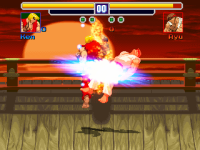
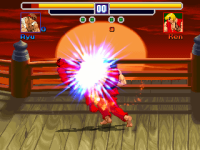
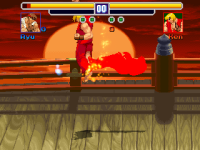
Guys. I want to know what you guys think about the use of color effect everytime Ken does his flaming Shoryuken to any opponent. I already set this fall anim with drawmethods tintcolor and tintmode together. However, I haven't added the fire effect over the fallen/knocked-out opponent yet. I'll add it later.

Tintmode 1:

My Mod - 0895.png


Tintmode 2:
My Mod - 0898.png

Tintmode 3:
My Mod - 0899.png

Tintmode 4:
My Mod - 0900.png

Code:
anim fall23
    offset 41 87
    bbox 4 3 67 72
    delay 500
    #jumpframe 0 1 -0.5 0
    drawmethod tintmode 2
    drawmethod tintcolor 255_0_0
    dropframe 1
    landframe 4
    frame data/CHARS/Ryu/0503000000.gif
    offset 40 70
    bbox 0
    delay 9
    frame data/CHARS/Ryu/0503000020.gif
    offset 38 93
    frame data/CHARS/Ryu/0503000040.gif
    offset 27 92
    delay -500
    frame data/CHARS/Ryu/0503000050.gif
    delay 3
    offset 39 63
    nodrawmethod
    frame data/CHARS/Ryu/0504000000.gif

I'm not sure about tintmode 1 but it looks okay. Tintmode 2 kinda looks like it was from CVS2 or some game title. Tintmode 3 reminds me of the effect from Samurai Shodown. I don't have anything to say about tintmode 4, other than saving it for some cases of events. Otherwise, I wouldn't use it. If any of you don't like these effects in the shots, you are welcome to create a burning palette for the opponent. Just a sample. It doesn't have to be indexed since I haven't shown an indexed sprite (of a fighter) here yet.

I think the only exception is Hawkeye, but he moves backward on GRABBACKWARD while he stomps on the enemy chest and then shoot an arrow.
Man, I thought there was a slam script in it until I checked it. I didn't know there's no slam script for him, as well as flipx of drawmethod. 😆
 
Nothing special here but I made a color select system for pressing certain buttons like you see in most traditional fighting games. So far, I got 2 alternate palettes mapped out, leaving one default palette as default. Thanks to @Bloodbane for the color/palette base. 🍺 I mapped the alternate palettes on certain buttons as a test.
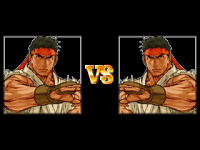
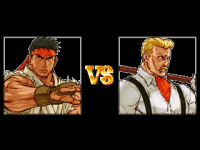
 
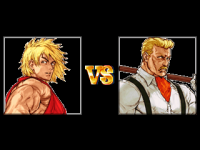
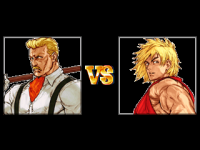
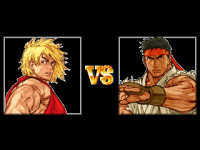
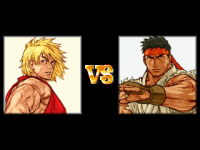
VS screen completed with players' and CPU's own portraits displaying before battle. This is currently exclusive for Arcade mode.

P1 VS COM:
View attachment 11822
View attachment 11824
View attachment 11823

COM VS P2:
View attachment 11825

P1 VS P2:
View attachment 11826

Nice concept the white bodrers around the portraits are strange... some suggestions.

-try to remove them.
-Or make thicker white borders
-Or manage to have white background behind portraits.

Nice to see some progress.
Keep it up!
 
Back
Top Bottom