
You are using an out of date browser. It may not display this or other websites correctly.
You should upgrade or use an alternative browser.
You should upgrade or use an alternative browser.
Photoshop making Openbor crash
- Thread starter CountDownM
- Start date


Im having truble with openbor when I export a png file from photoshop it makes it crash and givs no error. it is indext and has the right path.
You are most likely forgetting to set 8bit color. For direct export from Photoshop, use Save for Web (Legacy) and make sure to choose png-8 type.
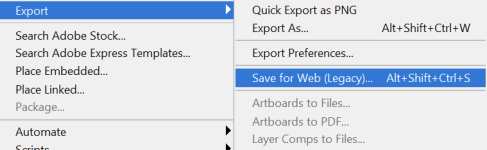
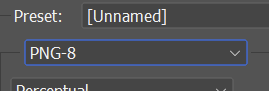
HTH,
DC

Try to apply the default palette using PalApply.Nope still crashes
It also happens after saving an image file using Gimp, even if everything looks correct with the file.

How many colors does that image have? If it's less than 16 or 17 colors, use PalApply to apply that image as a palette after it in Photoshop or GIMP.
What? Where did you pull that number from? There's no such thing. PalApply works on any 8bit palette.
DC

Bloodbane
Well-known member
Nope still crashes
Strange, I've tried putting the image in OpenBoR and it is displayed fine, including the antialias. Maybe the crash is caused by something else.
CountDownM
Member
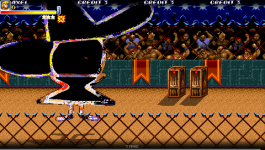
ok fixed all the issues but found another i used Plambos Palapply tool and i got this in game 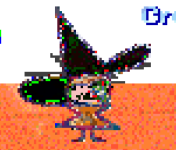 when i gave the pic like this
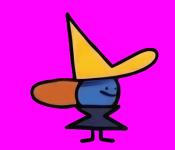 and i even uesd a pallet.
when i gave the pic like this and i even uesd a pallet.
I tested your image and it seems that your character does not have the palette properly organized.ok fixed all the issues but found another i used Plambos Palapply tool and i got this in game View attachment 14458 when i gave the pic like thisView attachment 14459 and i even uesd a pallet.
The model will use the first sprite of the first animation as a default palette in case the "palette" command is missing. So, all you need to do is to apply the same palette for all sprites using PalApply and then I recommend declaring the path for the default palette command at the character header, like this.
palette data/chars/heroes/axel/sor3/1776122207040.png
In this test, I didn't declare the "palette" command and the model is using the first Axel sprite as a default palette.
However, in this second test I put your image as palette in the header.
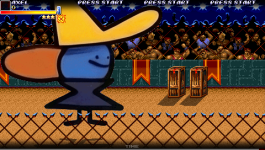
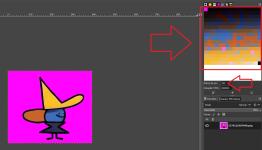
Keep in mind that although the sprite appears to have around 6 colors, it actually has many similar shades for those same colors, totaling 255.
Bloodbane
Well-known member
You need to use video.txt to define resolution. If you don't have it, then just create one.Thx Also how do i get more resolution?
Read manual for more info about video.txt.

@CountDownM But the engine will show the sprite exactly as it is. Changing the resolution will not improve the image automatically, it will just change the pixel size. You still need to make it manually sprite by sprite.but my sprite looks verry bad quality even tho it is 4kView attachment 14505
Keep in mind that indexed images have a maximum of 256 colors. So, in case you are creating everything as 24-bit png, you may lose many colors during the conversion, decreasing the quality.

but my sprite looks verry bad quality even tho it is 4k
You can improve the quality (sharpness) of your sprite by limiting the colours of your palette. currently you are using over 250 colours
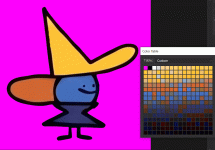
CountDownM
Member
How do I delete colorsYou can improve the quality (sharpness) of your sprite by limiting the colours of your palette. currently you are using over 250 colours
View attachment 14511