Chronocrash Modders Tools

ChronoCrash Modders Tools 0.7.9.10.1

No permission to download
If I may, please... please don't do that. That's one of things that looks great on paper, but never work in practice.
I got your point, but one of the things which made Stats a hit was the incorporated manual.
And as I update the manual for years, I can say that there was information there which wasn't present on the manual.

My idea wasn't to include the whole manual, just some tiddybits so people could understand (or remember) what they are about to change.
For example, you have "jumpframe" and, once you hover the mouse, a popup would appear saying:
jumpframe {frame} {speedy} {speedx} {speedz} {dust}
Just that, nothing more. I constantly forget if X or Z comes first, for example.
We could have a READ MORE link with the link to the said information on the wiki, but I am afraid that link changes will screw this up - the sole reason I use DCEmulation manual is because its the same link since forever, while the official one have changed its url many times down the years.

That is my main concern.

But since many things will change in the next 4.0 build, maybe this idea won't work (or, at least, it won't be a good idea to make it now).
As an example, we will move from this:

no_adjust_base 1
subject_to_gravity 1
subject_to_max_z 1
]subject_to_min_z 1

to this:

move_constraints no_adjust_base subject_to_gravity subject_to_max_z subject_to_min_z

Which will render the documentation outdated.
Manual at hand and having it in software is just one less windows to clutter desktop so... how about a normal html/pdf/txt viewer panel that will just open html or txt or whatever, and we can just put the manual as html, pdf or txt ourselves in one of the folders so its our choice ?

And the searchbox woud be automated so we type in command and it already appears without havin to enter

A searchable so we can search for anything inside manual but also edit the manual ourselves maybe not in program itself but like a normal html or txt.
Sorry, but I don't see the point of having this. If I need to download a file and make it searchable...its better to have it online anyway.
But I agree with you of being better to have an offline solution.

About the path creating thing, IMO fastest is just having one line and clicking a button to autogenerate next lines
I don't want to sound boring, but I don't see the point in this either. We already support drag and drop, which is much faster.

Currently, it only works with images - if you try to drag a sound file, it creates a line with "frame" instead of "sound". That could be interesting to have in the tool.
 
@Piccolo I was working on a stage where I use the native "water". But looks like the tool isn't displaying it - yet, it appears as a gray background:

1701037842442.png

This is how it should look:
1701037876214.png

This is the water image (just a crop, its as wide as the stage is):
1701038107977.png
water data/levels/4-G-Axe/GAXE_3_BG2.gif

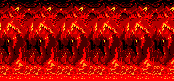
And It isn't displaying the fglayer with the lava either. As I checked on the tool, looks like you have to again make the Z positive in order to see it:

1701038034131.png

fglayer data/levels/4-G-Axe/GAXE_3_lava.gif 399 0.5 1 0 21 0 0 -1 1 0 0 3 1 1.5 1 1 1 0
 
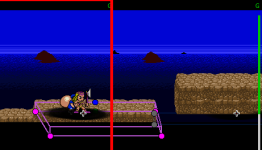
Yeah I can confirm native Water isn't working, but fglayer with a water setting is:

This is a fglayer (the ocean)
1701038226875.png

The same image, used as a native Water:
1701038259226.png
 
Yeah I don't remember implementing water. Nor neon and mirror. I'll look into it next week ;)
Awesome!
And it would be magical if Neon worked as it work on the engine, by shifting the specific colors on the color table :)

Two other ideas (one is more an improvement):

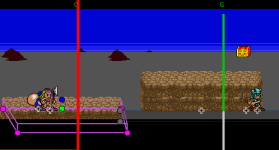
- The cursor is displayed as a hand icon (which makes sense to move parts), but its hard to get the exact position of its center. So maybe it would be better to have a cross by either: a) you hold CTRL to display the cursor as a cross b) the cursor start as a cross and just change to a hand once you drag something

- The offset preview on the bottom left is very useful. But would be possible to include something like you did on animation preview - to count the distance from the last WAIT line.

So the text would display to positions like this:
(Edge: 626x262 - Wait: 100)
(I don't think we need a Z distance from the wait point)
1701044122990.png
 
Two other ideas (one is more an improvement):

- The cursor is displayed as a hand icon (which makes sense to move parts), but its hard to get the exact position of its center. So maybe it would be better to have a cross by either: a) you hold CTRL to display the cursor as a cross b) the cursor start as a cross and just change to a hand once you drag something

- The offset preview on the bottom left is very useful. But would be possible to include something like you did on animation preview - to count the distance from the last WAIT line.
Yep I can do that ;)

In levle editor the cursor by default is a hand because you can literally drag the level. I will probably let it like that by default but when you press or hold CTRL it switches to a non-dragging mode, and the cursor is either an arrow (probably will be an arrow unless someone thinks it's a problem) or a cross.

I'll also add clickable toggle (checkbox) for that to the right.
 
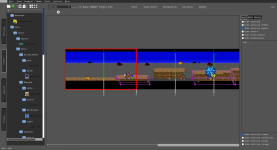
Piccolo updated Chronocrash Modders Tools with a new update entry:

Changelog 0.4.7.3

- Drag and dropping sounds files (.wav, .ogg, .bor) in text editors now write lines with "sound" command instead of "frame" command

- Added a button "Generate paths" in main editor, next to undo and redo buttons. This button opens a dialog that let you generate paths based on a mask. But don't forget that you can also drag and drop files to input multiple paths without manually typing them @bWWd @DCurrent

- Level Editor : Initial support for z scrolling and...

Read the rest of this update entry...
 
Oh cool, another update :)

Level Editor : Initial support for z scrolling and zRatio property. I don't know if it works correctly I would need a level that uses z scrolling and zRatio on some layers to work further on this.

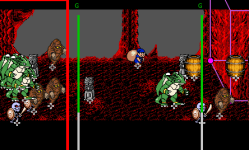
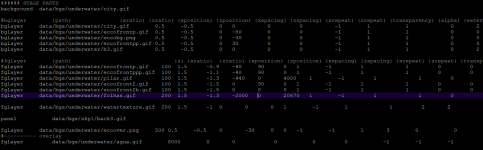
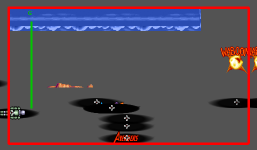
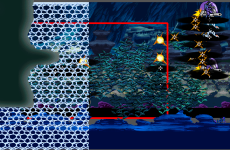
I have one and I tried it on the editor, but many layers doesn't appears:

1701203519067.png

It's one of the most complex stage I have on my game - uses a lot of layers (both bglayers and layers), but the tool displays only the panel

1701203648752.png

The stage in action:

edit:
by the way, the lines with issues listed on the right panel:


shadowcolor -1
at 0

shadowalpha 2
at 0
 
It's because CMT computes level width based on panel and order commands. Here in this level you have a small (150px wide) empty (transparent) sprite as the panel, that's why a lot of things don't show up.

I wonder how the engine compute level width ? @DCurrent

Deleted my previous post to write a better explanation.

Level width is indeed calculated by panels. The formula is pretty simple:

C:
 level->width = level->numpanels * panel_width;

 if(level->width < videomodes.hRes)
 {
     level->width = videomodes.hRes;
 }

 scrollmaxx = level->width - videomodes.hRes;
 scrollmaxz = panel_height;

Here's the catch though. Unless I am completely misreading (and I don't think I am) the variable panel_width is rewritten each time a panel reads in. In other words, level width is the number of panels multiplied by the width of last panel loaded in order. Same principal for height. Also note that the scrollmax variables are floats, but level->width member is a signed integer. So theoretically, the maximum size of a level is 2.4 billion pixels on each axis.

It's important to keep in mind, level limits are not world limits. The game world always stretches in all directions to 3.4E+38 pixels (max values of a floating point). The left side of your screen at level start is X 0 position. Your default base is the Y 0.

HTH,
DC
 
Last edited:
Deleted my previous post to write a better explanation.

Level width is indeed calculated by panels. The formula is pretty simple:

C:
 level->width = level->numpanels * panel_width;

 if(level->width < videomodes.hRes)
 {
     level->width = videomodes.hRes;
 }

 scrollmaxx = level->width - videomodes.hRes;
 scrollmaxz = panel_height;

Here's the catch though. Unless I am completely misreading (and I don't think I am) the variable panel_width is rewritten each time a panel reads in. In other words, level width is the number of panels multiplied by the width of last panel loaded in order. Same principal for height. Also note that the scrollmax variables are floats, but level->width member is a signed integer. So theoretically, the maximum size of a level is 2.4 billion pixels on each axis.

It's important to keep in mind, level limits are not world limits. The game world stretches in all directions to 3.4E+38 pixels (max values of a floating point). The left side of your screen at level start is X 0 position. Your default base is the Y 0.

HTH,
DC
Ok thanks for the answer. CMT computes level width differently, its sums the actual width of panels.

But this difference doesn't explain the oddity of why the level @O Ilusionista shared in the video works in OpenBOR (as shown in the video), because the full width of that level should be 150 px according to both computations (OpenBOR and CMT).

Until @O Ilusionista confirms or disconfirms, I'll assume that the level he tried to load in CMT (and that I tried to run in CMT too) is actually not the same version as the one running in the video (an unfinished version of the level in the video I would guess). That would explain everything.
 
It's because CMT computes level width based on panel and order commands. Here in this level you have a small (150px wide) empty (transparent) sprite as the panel, that's why a lot of things don't show up.
That is because the stage is one screen wide only (it uses the same background from the sky level). Both the underwater and the stage levels are one screen wide, so you don't move throught the level, be enemies are grouped by a lot of groups.

A level cannot be shorter than videomodes.hRes. And since I am using 480x272, even if my background is smaller than this, this means one videomodes.hRes scale, IOW, 480px wide.

By the way, neither the panel nor the background needs to be as wide as the stage - and there is a trick on how to make the mirror reflection appears only on a part of a stage and not on the whole stage, by using a shorter background (as mirror happens between panel and background). If you open "stree_1_branch.txt" from my Avengers game, you will see it in action and will see that I use a shorter background, so the reflection happens only on the first part of the stage :)

I went ahead and resized the panel to 480px wide and the result is pretty much the same:

1701213039702.png
(I THINK this stage was available in the last demo, just not playable yet. Look for "underwater1.txt" inside the pak)

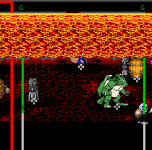
Talking about the sky level, once you open it up it shows the layers on the right order:
1701212646301.png

but once you press left or right, the order get screwed up
1701212677347.png

And this happens even after I expanded the panel to 480px
 
Ok now I understand.

It's working if the panel is at least bigger than the infinitely repeated images (xRepeat = -1). If not these those images with xRepeat=-1 won't be displayed at all.

Because here's how CMT currently computes what xRepeat -1 means :

Code:
if xRepeat == -1:
    xRepeat = self.fullWidth / (image.width() + xSpacing)

Where self.fullWidth = full level width (here 150px, or 480px if you take the screen value as it's bigger)
image.width() is the width of the infinitely repeated image

So yeah using that formula you get 0 if the fullWidth is smaller that the image width.

I guess I could default actual xRepeat to a minimum of 1 ? There is probably no reason for a declared image to have an actual xRepeat of 0 (unless you precisely set a xRepeat of 0, and not -1).
 
Just to give a bit more info:
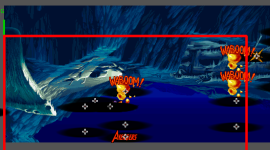
When I resized the panel graphic to exactly the video resolution, I can see the almost all the graphics (excluding the Water, which isn't supported yet)
1701213914916.png

But once I move the cursor, everything gets messy:
1701213938588.png
 
Just to give a bit more info:
When I resized the panel graphic to exactly the video resolution, I can see the almost all the graphics (excluding the Water, which isn't supported yet)
View attachment 5887

But once I move the cursor, everything gets messy:
View attachment 5888

I'm currently building an update with the fix mentioned in my previous post, if it was indeed just that then all the layers should be displayed. Will upload it in around 5 minutes ;)
 
Back
Top Bottom