Solved Minor Help

Question that is answered or resolved.
For some reason my player can't connect any attack after the first attack connects. The animations play but there is no move contact or damage. I have the attack boxes set as well as damage and pause times and I added atchain 1 2 4 3 in the header so I can't think of what could be causing this also the first attack seems to rarely to connect as well so any info on the issue would be appreciated.
 
Is there way to have an animation use its own palette instead of the palette shared by all the sprites? I want the block animation to use its own palette the only thing close I found in the manual so far is force palette but that is for attacks
 
Thegr8test said:
Is there way to have an animation use its own palette instead of the palette shared by all the sprites? I want the block animation to use its own palette the only thing close I found in the manual so far is force palette but that is for attacks

Why don't you just expand the palette?
What I meant by expanding palette is you add the extra colors you need for block animation to the palette. Technically, with Photoshop, it's like this:
- Save the previous palette as say pal.act
- Open your block sprite (pick the one that contains all extra colors if possible)
- If that sprite is in indexed, convert it to RGB first
- Convert that sprite to indexed, when asked which palette to use choose Exact BUT set forced palette. Pick pal.act as the palette
- Click ok
- Check the palette/color table. You'll see that previous palette is there and extra colors are placed after that palette. Oh save this palette to say pal2.act
- Apply this palette to all blocking sprites
- Open the sprite which is used as palette reference in this character. If you don't set any, then pick the very first sprite in first declared animation
- Open its color table and load that pal2.act to replace it

That should do the trick :)
And no, you don't need to change the palette of the other sprites ;)

That's what I usually do when I need to add more colors to the palette. Well, the catch is any alternate palettes created before this must be remade. Buut it's not big deal :)
 
That's a bit over complicated Bloodbane...

You can merely open an image that has the default palette, edit the colour table and add the missing colours from the block sprites.  Save this PAL and apply to all images.
 
If the missing colors can be counted with fingers, then yes, adding them manually is better but if you can't even tell the missing colors, it's best to just use Photoshop to add them :)
 
Again, for adding new colors to a existing palette, you should use Fighter Factory. You can copy the colors to a specific spot or even can make the program to add just the different colors.

Take a look:
vd161Ev.jpg


I selected 7 colors from the palette on the right and copied it to different spots to the palette at left.

FF can sort colors, remove duplicated colors, add different colors, color editing, visual editing on-the-fly palettes and many other things.
 
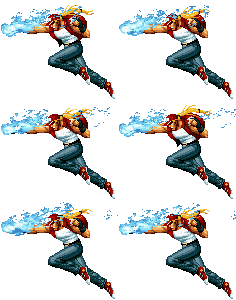
Hey guys I want to add effects to go with an attack but I'm not sure how to go about it

this is the move

terry-burnflm.gif


How do I add the blue effect on top of the attack and have it move properly?
 
It's best to spawn the effects seperately. Not only it spares you from palette update stuffs but it allows you to change the effect in case you change your mind :)

Now for this burning fist effect, it's best to use spawnbind function to spawn it.
 
I know some people will disagree (and I really don't use this method for Mugen stuff), but my answer is ... it depends.

For example, there are cases where I would suggest to use the effect directly on the character sprite. For each reason, the effect NEEDS to be close to character:

- if the effect shares the colors with the character
- if the effect needs to have shadow
- if the effect is a "blur", to simulate speed, where it parts of the character
- You will use it for one time only

I say this because for each effect, you will need to make another entity, and its another entity to engine to load, another entity to handle...
it's best to use spawnbind function to spawn it.
...and bindentity (which spawnbind uses) has a known bug.

There are cases where I would suggest you to make it as a different entity:

- There are too much colors to add on the character palette
- you will need to use the same effect for other characters
- Effects that need to be subject_to_"something". For example, if you will spawn an effect on the ground, it needs to be a different entity, or it will appear on the air if you are near a hole, or over a platform.

Or you will spawn an effect away from the character and it will look strange if it appears inside a wall.

So, my advice is: think about it. Take every consideration before to take that decision.

 
Back
Top Bottom