You are using an out of date browser. It may not display this or other websites correctly.
You should upgrade or use an alternative browser.
You should upgrade or use an alternative browser.

In Progress Nekketsu Kouha Kunio-kun Re v0.03
No permission to download
- Thread starter DD Tokki
- Start date
The project is currently under development.


NED
Well-known member
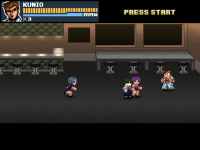
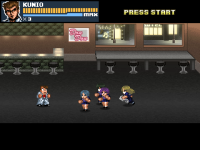
Absolutely excellent !!So I made the music again.
This is Misuzu now !!

O Ilusionista
Captain 100K
A simple and cool trick you can use is to make different spawn animations which will be randomly triggered during the normal spawn animationFor this project, I added the intro for Stage 3 and created the animation for enemies to appear at the club entrance.
I use this function in the first frame of the spawn animation, which makes the character randomly change spawn animations using "follow" type animations. For example, I leave the default spawn animation as the enemy simply walking and entering the screen, but I create alternative animations with them running or just making a small jump on the screen.
This makes the spawns less repetitive, makes each playthrough different, and you can even have customized spawns for specific cases, such as enemies coming out of doors, jumping off rooftops, etc.
You can see the code in action here, at 0:41
If you want something more advanced, you can randomize the Z position where they appear in the level or even create an invisible entity that randomly summons certain types of enemies, making each playthrough even more different.
The function (put it on your animationscript file)
C-like:
void randomAnim(int iLimit, int iChance, int Ani)
{ // Randonly goes to another animation, based on the chance
// Douglas Baldan - 15/06/2018 - Thanks Bloodbane
// http://www.brazilmugenteam.com
    void self = getlocalvar("self");
    int r = rand()%iLimit;
    if(r > iChance){
        if (!getentityproperty(self, "dead")){
        performattack(self, openborconstant(Ani));
        }
    }
}
Usage:
@cmd randomAnim 30 0 "ANI_FOLLOW1"
Thanks for the mention, I appreciate itI created the credits in advance


A simple and cool trick you can use is to make different spawn animations which will be randomly triggered during the normal spawn animation
I use this function in the first frame of the spawn animation, which makes the character randomly change spawn animations using "follow" type animations. For example, I leave the default spawn animation as the enemy simply walking and entering the screen, but I create alternative animations with them running or just making a small jump on the screen.
This makes the spawns less repetitive, makes each playthrough different, and you can even have customized spawns for specific cases, such as enemies coming out of doors, jumping off rooftops, etc.
You can see the code in action here, at 0:41
If you want something more advanced, you can randomize the Z position where they appear in the level or even create an invisible entity that randomly summons certain types of enemies, making each playthrough even more different.
The function (put it on your animationscript file)
C-like:void randomAnim(int iLimit, int iChance, int Ani) { // Randonly goes to another animation, based on the chance // Douglas Baldan - 15/06/2018 - Thanks Bloodbane // http://www.brazilmugenteam.com void self = getlocalvar("self"); int r = rand()%iLimit; if(r > iChance){ if (!getentityproperty(self, "dead")){ performattack(self, openborconstant(Ani)); } } }
Usage:
@cmd randomAnim 30 0 "ANI_FOLLOW1"
Thanks for the mention, I appreciate it
@O Ilusionista, I've brought this up a couple of times in similar posts, you need to stop using strings for value in the hot path, or at least stop passing the code as is because it's teaching bad habits. Run time population of
openborconstant() is bad... really bad, and so easily fixed.The issue is this line:
performattack(self, openborconstant(Ani));When
Ani is a variable, the engine cannot preprocess it. That means openborconstant() has to resolve the string at runtime every time the function runs. That is absurdly expensive because it requires searching through every available constant in the engine and comparing strings.openborconstant("ANI_FOLLOW1")= Can be seen by the engine while scripts are being loaded and compiled. OpenBOR can resolve it once at startup and replace it with the actual integer constant. At runtime, that is basically free.openborconstant(Ani)= The engine has no idea whatAnicontains until the function actually runs. Since it cannot preprocess the value, it has to resolve the string every time the command executes.
C:
void randomAnim(int iLimit, int iChance, int animation_id) {

    /* Guards */
    if(typeof(iLimit) != openborconstant("VT_INTEGER")
    || typeof(iChance) != openborconstant("VT_INTEGER")
    || typeof(animation_id) != openborconstant("VT_INTEGER")){
        shutdown(1, "\n\n ERROR: randomAnim(" + iLimit + ", " + iChance + ", " + animation_id + ") - Missing or invalid parameter.\n");
    }

    // Randomly goes to another animation, based on the chance
    // Douglas Baldan - 15/06/2018 - Thanks Bloodbane
    // http://www.brazilmugenteam.com
    void self = getlocalvar("self");
    int r = rand()%iLimit;
    if(r > iChance){
        if (!getentityproperty(self, "dead")){
             performattack(self, animation_id);
        }
    }
}
Usage:
Code:
@cmd randomAnim 30 0 openborconstant("ANI_FOLLOW1")HTH,
DC
O Ilusionista
Captain 100K
Yes buddy, I am aware of it@O Ilusionista, I've brought this up a couple of times in similar posts, you need to stop using strings for value in the hot path, or at least stop passing the code as is because it's teaching bad habits. Run time population ofopenborconstant()is bad... really bad, and so easily fixed.
- And every time I go to paste this code, I remember you, haha - The thing is, I haven't had time to migrate this code yet.
If you think it might end up confusing people, I can avoid pasting this code on the forum again and only post it when it's updated.
If you think it might end up confusing people, I can avoid pasting this code on the forum again and only post it when it's updated.
Just pass along post the updated version I posted.
DC
NED
Well-known member
Nice!
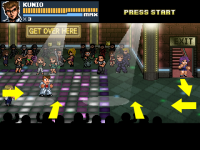
I have made changes to the ending credits to be more detail.
When writing the game title, I used both the original title and the export version title to avoid confusion.
By the way... Suzuka !! Suzuka !!

O Ilusionista
Captain 100K
Great! That brings more life to the level.I am currently working on the entrance directions and animations for enemy characters. Basically, they only appear from the sides, but I am trying to add more variety.
Question: the person who appears near the stairs, will they go down the stairs? Or will they appear with an alpha?

DD Tokki
Well-known member
Great! That brings more life to the level.
Question: the person who appears near the stairs, will they go down the stairs? Or will they appear with an alpha?
I reduced the character size using the scale command, placed it at the top, and created an effect where it gradually rises.
There is no change to the terrain; the character is positioned at the bottom from the start and then moves upward as if going up.
Last edited:
O Ilusionista
Captain 100K
I loved it, really. I would just reduce her velocity a bit when the reaches the higher area, because her velocity changes abruptly.I reduced the character size using the scale command, placed it at the top, and created an effect where it gradually rises.
other than that, nice work!