How to create a project from scratch - my 0 skills !

vokilvulga

Member
Hello. Chronocrash is an inspiring environment for all of us.
I would like to create an OpenBoR game.
Unfortunately, this is a completely new environment for me and I am I have no skills.

I would like to start by creating something elementary.
I think that, recompiling ready-made elements will be a good start.

My idea is to add or replace ready-made character models, on a ready-made matrix ...
Such a matrix could be the SEEP's game Fatal Fury Final or the game Beats of Rage.

My subject is wrestling, focusing on the power characters for plaiers, such as Max, Zangiev and M. Power and others.

Can you tell me where to find ready-made models and how to add them, as well as what program to use to operate with openbor.
 
Thanks @volkilvulga for your kind words about Openbor. I feel the same about this wonderful engine wish to stay with it for years :) .
You can contact @jeremiah.cuff who is developing a wrestling game, maybye Jeremiah and you can work together, so you can learn some basics too:

Moreover, you can contact me if you need some help in any part of the development ;) .
 
Oh! Thank you very much - I have already started to orient myself.

I've already managed to create a elementary recompilation, I've added characters and changed the features and some of the sets - now people fall when they're on the truck and fight when they're in the air. And the atmosphere is made up of pixels.

Now I guess if I replace the images with my own without changing the encoded names, they will be reproduced in place of the old images.

msmalik681 - Thank you

I see that you use GIMP for image modeling - is this program suitable?
At a later stage, I plan to print images from an old comic book and use them to create new figures that can be used to load games.
if there is a painter or craftsmans in the group - I suggest you take a look - you will probably find inspiration for many new projects that can be realized.
magazine rainbow dobromir in traps, magazine rainbow dobromir's fights and many more magazine rainbow
It's still too complicated for me - I prefer to mix ready-made models.


Now the next step.

?-Where to find ready-made scripts to paste. my be an library with scripts or directly from or directly from a ready-made game.

?-How the game chooses the main character, with whom gamers will play and who will be the enemies.
How can i install a character as the main player?
 
Last edited:
Now the next step.

?-Where to find ready-made scripts to paste. my be an library with scripts or directly from or directly from a ready-made game.

?-How the game chooses the main character, with whom gamers will play and who will be the enemies.
How can i install a character as the main player?
Hello Vokivulga, this is Jeremiah Cuff here, if you wish to copy scripts from existing fan games for your new project, I would try recommending games to download like Super Final Fight Gold or World Heroes Supreme Justice.

About your question to add characters to your project, there's a txt file above the levels file called models, and you can add player characters, enemies, items, and miscellaneous visual effects sprites by typing the names and the folders of the added content from the chars folder within the text file. They just have to be spaced out and have the words "Know" and "Load" at the end of the names.
 
Hello Vokivulga, this is Jeremiah Cuff here, if you wish to copy scripts from existing fan games for your new project, I would try recommending games to download like Super Final Fight Gold or World Heroes Supreme Justice.

About your question to add characters to your project, there's a txt file above the levels file called models, and you can add player characters, enemies, items, and miscellaneous visual effects sprites by typing the names and the folders of the added content from the chars folder within the text file. They just have to be spaced out and have the words "Know" and "Load" at the end of the names.
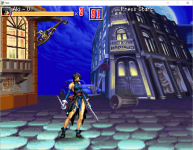
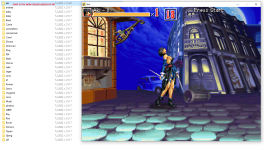
My firts playble charr. its Aki or Shiki in diferent games. Thank you...! very much !
path in

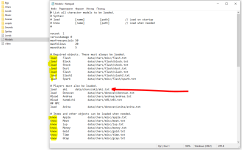
I copied the pack of the finished Aki template and put it in the data / chars folder - along with the other characters in the game.
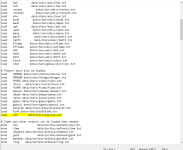
then I opened the text file data / MODELS and added the following line -
load aki data/chars/aki/aki.txt

I guess this line indicates where the Aki command file is located, which OpenBoR should read.
the original command line is the same but indicates the path to the donovan folder. load Donovan data / chars / donovan / donovan.txt

Now I will train with the addition of characters and for the next step we will probably design the upholstery - background. It looks very intriguing.
 

Attachments

  • Заснемане.PNG
    Заснемане.PNG
    44 KB · Views: 32
  • ob-prog.PNG
    ob-prog.PNG
    57.1 KB · Views: 34
  • bor-shiki.PNG
    bor-shiki.PNG
    554.2 KB · Views: 29
  • tempsnip.png
    tempsnip.png
    554.3 KB · Views: 33
My firts playble charr. its Aki or Shiki in diferent games. Thank you...! very much !
path in

I copied the pack of the finished Aki template and put it in the data / chars folder - along with the other characters in the game.
then I opened the text file data / MODELS and added the following line -
load aki data/chars/aki/aki.txt

I guess this line indicates where the Aki command file is located, which OpenBoR should read.
the original command line is the same but indicates the path to the donovan folder. load Donovan data / chars / donovan / donovan.txt

Now I will train with the addition of characters and for the next step we will probably design the upholstery - background. It looks very intriguing.
You're doing great with the basics my friend. I heard that you wanted to make a project that revolves around power characters such as Zangief, Muscle Power, and performing both wrestling and grappling techniques, you can always use my Real Bout Pro Wrestling project as a base for your fan game if you want to, here's the link to the demo of my project:
 
Справяш се чудесно с основите, приятелю. Чух, че искате да направите проект, който се върти около енергийни герои като Zangief, Muscle Power, и извършване както на техники за борба, така и на граплинг, винаги можете да използвате моя real Bout Pro Wrestling проект като база за вашата фен игра, ако искате, ето линка към демото на моя проект:
https://www.mediafire.com/file/j3st2h9phdpg0f8/Real_Bout_Pro_Wrestling_Demo.zip/file
Oh! I've already tried your game. 🎅 The demo looks very promising and interesting. I appreciate you providing it. Because these are the styles I like and stick to.

In fact, I want to add the strong characters, as well as Raimundo and E. Honda - if I find the right size for this character.
in a game like Fatal Fury Final or World Heroes Supreme Justice.

And so :
Next step:

- How to open and model the .pak file? How to create a .pak file?

In the demo that I use - there is a .data folder, where I edit files or get new parts to replace.
I guess these folders are also the contents of the .pak file.

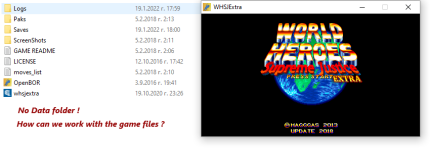
However, in most games I do not see the .data folder.
About how I can edit games that do not have a separate .data folder?
We probably need to open the .pak file somehow and then make the necessary adjustments.
 

Attachments

  • openbor palete.PNG
    openbor palete.PNG
    462.4 KB · Views: 13
  • openbor palete-w.PNG
    openbor palete-w.PNG
    43.2 KB · Views: 14
Last edited:
Of course. Pak files are used for complete games. WIP games/modules are best unpaked and have data folder visible.

So have you managed to unpack a pak yet?
- your reference to the OpenBoR template helped a lot in perception openbor

I still don't know how to open the .pak file and also how to compile the .pak file.
In a few words ...
can you explain to me with what program and how?

And one more thing - my attempts to put the character of Aki in the game Konpaku [v.3.0 Build 2727] [No Pak!] failed.
Is this an incompatibility between the engine codes or is there an additional algorithm that needs to be introduced.

Konpaku [v.3.0 Build 2727][No Pak!].zip-Konpaku [v.3.0 Build 2727]
openbor engine deaful creator.zip-my palette
in my palette I added this character easily, but here it seems impossible.
 
Last edited:
@vokilvulga Konpaku was a terrible demo I released almost 15 years ago, Anything in there will be unbelievably outdated and mostly incompatible so please don't learn or practise anything from it.
 
@vokilvulga Konpaku was a terrible demo I released almost 15 years ago, Anything in there will be unbelievably outdated and mostly incompatible so please don't learn or practise anything from it.
oh nevertheless, the direction and scenario of this demo radiate dynamics deep inside. Short 25 minutes gameplay, but with Very intriguing cover.
Probably new ideological successors to this game have already been produced.
In fact, I have an idea in my head.
Combine several games into one common mega strategy game. For which I will open a new topic and maybe the community will be interested. For future development.
I would develop it but I lack skills.

For now, I'm more interested
- How to open and model the .pak file? How to create a .pak file?
 
Last edited:
In Neo Edit pack, there's tool called borpak.exe which could do both. However, for easier use it's suggested to use special .bat file for each purpose.

How to create a .pak file?

You need borpak.exe and this .bat file:
packer.bat
Code:
:: Name: packer
:: Author: Plombo
:: Frontend for borpak that emulates Senile Team's "packer" utility.
:: Put this file in the same directory as the borpak executable.
@echo off

if (%1) == () goto USAGE
if (%2) == () goto USAGE
if not (%3) == () goto USAGE

%0\..\borpak -b -d %2 %1
goto END

:USAGE
echo Usage: %0 ^<packname^> ^<dirname^>
goto END

:END

If you don't have that .bat file, create one with lines above.
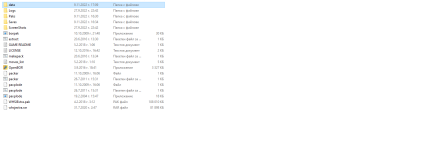
Place both exe and bat in same folder as data folder and run packer pakname.pak data .

How to open and model the .pak file?

Same as above, but this .bat file :
paxplode.bat
Code:
:: Name: paxplode
:: Author: Plombo
:: Frontend for borpak that emulates the "paxplode" utility.
:: Put this file in the same directory as the borpak executable.
@echo off

if (%1) == () goto USAGE
if not (%2) == () goto USAGE

%0\..\borpak %1
goto END

:USAGE
echo Usage: %0 pakfile
goto END

:END

If you don't have that .bat file, create one with lines above.
Place both exe and bat in same folder as pak file and run paxplode pakname.pak .

HTH
 
Hello. Chronocrash is an inspiring environment for all of us.
I would like to create an OpenBoR game.
Unfortunately, this is a completely new environment for me and I am I have no skills.

I would like to start by creating something elementary.
I think that, recompiling ready-made elements will be a good start.

My idea is to add or replace ready-made character models, on a ready-made matrix ...
Such a matrix could be the SEEP's game Fatal Fury Final or the game Beats of Rage.

My subject is wrestling, focusing on the power characters for plaiers, such as Max, Zangiev and M. Power and others.

Can you tell me where to find ready-made models and how to add them, as well as what program to use to operate with openbor.
so I have also started and I have no idea what I'm doing! for recolouring/redesigning the sprites do I need to update the code? View attachment 1449
 
In Neo Edit pack, there's tool called borpak.exe which could do both. However, for easier use it's suggested to use special .bat file for each purpose.


You need borpak.exe and this .bat file:
packer.bat
Code:
:: Name: packer
:: Author: Plombo
:: Frontend for borpak that emulates Senile Team's "packer" utility.
:: Put this file in the same directory as the borpak executable.
@echo off

if (%1) == () goto USAGE
if (%2) == () goto USAGE
if not (%3) == () goto USAGE

%0\..\borpak -b -d %2 %1
goto END

:USAGE
echo Usage: %0 ^<packname^> ^<dirname^>
goto END

:END

If you don't have that .bat file, create one with lines above.
Place both exe and bat in same folder as data folder and run packer pakname.pak data .


Same as above, but this .bat file :
paxplode.bat
Code:
:: Name: paxplode
:: Author: Plombo
:: Frontend for borpak that emulates the "paxplode" utility.
:: Put this file in the same directory as the borpak executable.
@echo off

if (%1) == () goto USAGE
if not (%2) == () goto USAGE

%0\..\borpak %1
goto END

:USAGE
echo Usage: %0 pakfile
goto END

:END

If you don't have that .bat file, create one with lines above.
Place both exe and bat in same folder as pak file and run paxplode pakname.pak .

HTH
i can't find the neo edit pack could somebody send the link?
 
Hello @Zachary69

Here's the neo edit pack


Make sure you watch the video msmalik681 posted earlier.
 
Hello @Zachary69

Here's the neo edit pack


Make sure you watch the video msmalik681 posted earlier.
Thanks I appreciate this I'm watching the vid currently
 
Thanks friends.💫

I haven't visited the forum in a long time, but my attempts to produce a remix are still ongoing. I've made some progress. Especially thanks to Zvitor's game - God of War Ragnarok.

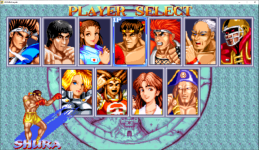
Now I'm trying to add or exchange characters in Magggas' World Heroes Supreme Justice Extra game but unfortunately it doesn't work. I entered the command '' load lee data/chars/lee/lee.txt '' in the ''models'' file, but it did not add the non-walkable character to the game's start menu.

The menu probably needs additional commands somewhere in the command files to make the addition possible, but I can't find them.

You know, what else is needed to add new characters to this platform?
 

Attachments

  • real lee is not present.PNG
    real lee is not present.PNG
    1.7 MB · Views: 14
  • my 0 skills - add lee in models.PNG
    my 0 skills - add lee in models.PNG
    51 KB · Views: 12
  • my 0 skills.PNG
    my 0 skills.PNG
    36 KB · Views: 12
Welcome back @vokilvulga.

I'm afraid you've selected a poor module for learning purposes. World Heroes Supreme Justice is very advanced and uses a cursor offset trick in the select screen. You can't simply add a playable character and have it work properly. Take a close look at the selection background and the select images for other models. You can try to use them as a template.

DC
 
Back
Top Bottom