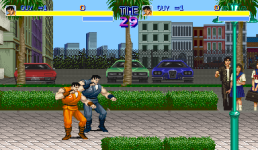
Street fighter 89

In Progress Street Fighter 89 The Final Fight by Machok v3.8.3

No permission to download
The project is currently under development.
they don't even care about the description
You can be sure of that, lol. I often receive comments of people asking for the download link of something I posted in the video description, lol.

Yes Cody and Haggar will get all the moves, all three have to stay in balance and this is why I can't add every new moves randomly
Oh yes! That is good to hear.

Last question: Any chance Carlos appear in this game?
 
my friend i never tried mp bar before in openbor when this bar is filled? I need to backup everything before I try adding super bar
As a suggestion, you can start testing the special moves costing health only, same as the native special/special2 does. If you feel the necessity of adding MP, then you can make it on a next step.
 
You can be sure of that, lol. I often receive comments of people asking for the download link of something I posted in the video description, lol.
:ROFLMAO:

Oh yes! That is good to hear.

Last question: Any chance Carlos appear in this game?

@NED and I do have a plan for Maki, still being discussed

Unfortunately there are no plans for Carlos yet, I've seen a custom sprite for Carlos (I think there's two versions?)
have you seen it too? which version do you think will fit cps1?

As a suggestion, you can start testing the special moves costing health only, same as the native special/special2 does. If you feel the necessity of adding MP, then you can make it on a next step.

I tried cost health only but not good for gameplay it's too demanding
 
  • Love
Reactions: NED
my friend i never tried mp bar before in openbor when this bar is filled? I need to backup everything before I try adding super bar
Testing it won't break anything, trust me.

Those are the steps:

1- Add a "mp" setting to your character header, like this:
name Billy
health 164
speed 14
mp 80

2- On the move you to spend MP, add this:
Energycost 20 1 0

20 is just an example.

energycost {int} {mponly} {disable}

  • Can be used in player's SPECIAL, SPECIAL2, and FREESPECIAL(#) animations.
  • {mponly} controls where this attack drains it's energycost from. It works exactly same with 'mponly' command below.
  • {disable} controls entities which can't use animation in which this command is declared. Useful to use same weapon models for players, NPCs and enemies with special abilities limitation.
    • 0 = None (default). Every entity can use this animation
    • 1 = All entities
    • 2 = Enemies and NPCs
    • 3 = Players and NPCs
    • 4 = Players and Enemies
  • When the attack is performed, (int) will be subtracted from one of the player's stats. Which one depends on several factors:
  • If the player has enough MP to use the attack, it comes from their MP.
  • If they don't have enough MP, but have enough HP to make up the difference and the attack is not set to 'mponly', their MP will be drained and the anything left will be taken from HP.
  • If the player has 'mponly' set to 2 or simply don't have an MP bar, this will always come from the player's health.
  • This command also work with enemies. Since enemies don't have MP, this command will only drain health.
  • If the user does not have more than {int} life remaining, they can't perform the attack. If they have a CANT animation, they will play that instead.
  • Defaults to 6 for SPECIAL and 0 for anything else.

Just one note: the CANT animation stated on the manual doesn't work. It never worked since I started working with OpenBOR (at least with the build I still use, 6330), I hope the devs could fix this someday.
If you don't have enough MP, you charcter just won't do anything. If you need to change animation when you are out of MP, you have to use a small script for that.

3 - the most annoying part is displaying the MP bar (you set this at levels.txt). But you can copy the values from the default BOR as a guide.
You will need to set the bar position for every charcter.

in MMPR game, I use like this:

mpbarsize 55 3 1 1 0 300 300 300 300
p1mp 59 252
p2mp 179 252
p3mp 299 252


MP can give you some cool tool to work with, like this:

iconmphigh {path}

  • Same as icon, except this appears when the entity's MP is full.
  • This only works for players. Other entities doesn't have MP.

iconmphalf {path}

  • Same as icon, except this appears when the entity's MP is half.
  • This only works for players. Other entities doesn't have MP.

iconmplow {path}

  • Same as icon, except this appears when the entity's MP is low.
  • This only works for players. Other entities don't have MP.
 
I tried cost health only but not good for gameplay it's too demanding
You could put a small health cost like 2 and keep adjusting until you feel it's fine. I was writing some mp instructions but @O Ilusionista posted everything you need to know, the only things I will add are:

- "typemp" command in the levels.txt file at the "set" header, which defines how the mp will be recovered during the game (by time or by hits).

1690941288061.png

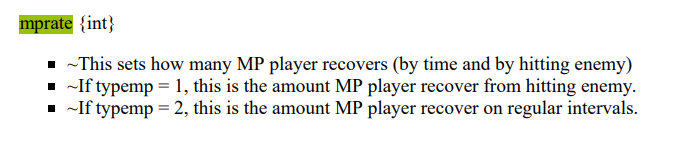
- "mprate" command at the character header, which defines the amount of mp recovered by each hit (by hits) or recovery cycle (by time).

1690941380459.png
 
- "typemp" command in the levels.txt file at the "set" header, which defines how the mp will be recovered during the game (by time or by hits).

View attachment 4677

- "mprate" command at the character header, which defines the amount of mp recovered by each hit (by hits) or recovery cycle (by time).

View attachment 4678
can we use both? MP slowly over time and when they hit enemy?

oh yeah, thanks, I forgot those :)

@machok here are the settings if you want something like this:
View attachment 4679
Thanks Ilu they looks really good
I might try to put the original super but if it looks tacky 🤭 I'll use the exact same as in your screenshot
 
I might try to put the original super but if it looks tacky
You mean the FF3 style, where you see a Super over the bar?

images

You can fake it using the iconmphigh as mentioned above - you just make a icon big enough with the word super over where the mp bar is

But if you want to replace the bar with the word super... You will need to script it.
 
Last edited:
I remember trying that iconmphigh feature but somehow the .gif image somehow didn't followed my HUD values and always showed up at x 0 y 0 in my screen. Am I missing something?
 
I have not checked all the feedbacks but I finally had the chance/time to try the demo.

Everything looks and feels so fluid again? it's a real pleasure to play it.

What I noticed or can point : (they are not things to fix, just things I noticed)

-Not sure about the F, B, F imput for a move in a beat em up. (At least it's a bit confusing for me)

-Grab down motion looks a bit strange to me. even if very accurate to FF3. Not easy to explain.
I mean, when guy flips the oppent before to take them to the ground, Guy is the actual axis of the rotation.
And to me it makes me feel like he handles the opponent just like a doll.
something Haggar would do easily (even if it still looks strange on Haggar too in FF3)
Perhaps not a better idea to have axis on opponent. But perhaps a try with the axis somewhere between Guy and the opponent (but a bit closer to Guy)
I'm not even sure it would look that good.

Again, I want to congratulate you for this progress...
I really like the direction it goes. :)
 
Only two things I would change, hitting objects with the knife makes them bleed, looks strange to see blood coming out of a wooden crate, and the fall animations feel too flat and bouncy.

I wouldn't put an MP bar to be honest but that's just my personal opinion.

Overall I love this game, I've played it for hours and it's quite addictive.
 
I just noticed I put " question mark "?" in a non question sentence ^^;

And yes, the game is addictive...

About the blood effect I'm pretty sure there are tons of ways to avoid it via script...

But I avoided this problem in my project by putting the blood effect in opponent get hit by knife anims. instead of attacker.
So, crates etc don't have it, and won't play it.
 
-Not sure about the F, B, F imput for a move in a beat em up. (At least it's a bit confusing for me)

Sorry NED next version will use d u S instead

-Grab down motion looks a bit strange to me. even if very accurate to FF3. Not easy to explain.
I mean, when guy flips the oppent before to take them to the ground, Guy is the actual axis of the rotation.
And to me it makes me feel like he handles the opponent just like a doll.
something Haggar would do easily (even if it still looks strange on Haggar too in FF3)
Perhaps not a better idea to have axis on opponent. But perhaps a try with the axis somewhere between Guy and the opponent (but a bit closer to Guy)
I'm not even sure it would look that good.

I am afraid when guy rises the offset wouldn't look good if I change the axis point?
and honestly I haven't paid much attention to this yet since I only following the original version

Again, I want to congratulate you for this progress...
I really like the direction it goes. :)

all the new moveset, is it too much? youtube comments say it needs at least one or two more moves

I wouldn't put an MP bar to be honest but that's just my personal opinion.

me too :)
I have tried it and the extra bar does look weird however there are 1 or 2 moves that require this so I need to think about this carefully

Overall I love this game, I've played it for hours and it's quite addictive.
😘 😘

About the blood effect I'm pretty sure there are tons of ways to avoid it via script...

But I avoided this problem in my project by putting the blood effect in opponent get hit by knife anims. instead of attacker.
So, crates etc don't have it, and won't play it.
Only two things I would change, hitting objects with the knife makes them bleed, looks strange to see blood coming out of a wooden crate, and the fall animations feel too flat and bouncy.

1. NED how to separate the regular flash and blood effect in opponent? :unsure: I always use noatflash 1 since it's simple but this is the cause
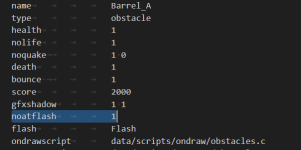
2. danno my setting is wrong, in the original I just realize that throw knife can't destroy the obstacle instead they fall like hitting the wall, how exactly to make something like this? I mean, how to make throw knife reflected when hit by obstacle (freight, barrel,drumcan)?
 
  • Like
Reactions: NED
me too :)
I have tried it and the extra bar does look weird however there are 1 or 2 moves that require this so I need to think about this carefully
If you like the idea I maintain my previous suggestion of putting a small health cost for certain moves, no mp bar required in this case. In a max health of 144, something around 2 per attack is a very small cost but enough to make the player think twice before spamming special moves all the time.

1. NED how to separate the regular flash and blood effect in opponent? :unsure: I always use noatflash 1 since it's simple but this is the cause
To solve this problem you can use both noatflash/flash commands in the obstacle's header, same as I'm doing with SORX. You will need to provide what flash entity will be used instead.

1691020337914.png
I
 
If you like the idea I maintain my previous suggestion of putting a small health cost for certain moves, no mp bar required in this case. In a max health of 144, something around 2 per attack is a very small cost but enough to make the player think twice before spamming special moves all the time.

Thanks I think this is the best solution for now, I'll keep testing 😀

To solve this problem you can use both noatflash/flash commands in the obstacle's header, same as I'm doing with SORX. You will need to provide what flash entity will be used instead.

View attachment 4687
I
this is one of the coolest things in OpenBOR, really.

Ahh Yes I already used it when I am working on belger arrow and break car bonus game, why I keep forgetting this 😅 😙
 
I think the move list is ok, but I would not mind having 1 or 2 extra moves.
Particularly if they are useful, and add more diversity to the gameplay.

Also, about axis, this is just something visual to me. (You're right, we should not change the axis)
perhaps it's possible to keep the axis but add transitions positions when Guy moves the opponent...
I'll try to come up with a picture mock up to explain.
 
Also, about axis, this is just something visual to me. (You're right, we should not change the axis)
perhaps it's possible to keep the axis but add transitions positions when Guy moves the opponent...
I'll try to come up with a picture mock up to explain.
Yes it will be clearer with visual 😀

@Kratus @O Ilusionista @danno
how to make knife hitwall effect with obstacle?
candamage on, they will break. candamage off they're just passing through


*just asking is not a game breaking though, knife destroying barrel is actually cool to see
 
Last edited:
  • Like
Reactions: NED
OK, I did a lazy mockup just to explain the transition frames. (2 transition frames, with white stars here)
During the transition frames, Guy use the frames where he is facing us, and he don't need to move axis or anything. (I lazily coved with orange...)
Only the opponent will move.

NKt6pyS.png


the 2 extra pictures shows how the move would look a bit more fluid with such steps.
I recommand giving these transition frames a short delay, or ajust the delay of all "rotation" sequence to avoid this move to be too slow because of 2 extra frames.

The game flow/speed should stay the same, it's already good.
Only visual transition is needed to me.
 
Back
Top Bottom